사용한 플랫폼 : Spring, Oracle
1. QnA 페이지
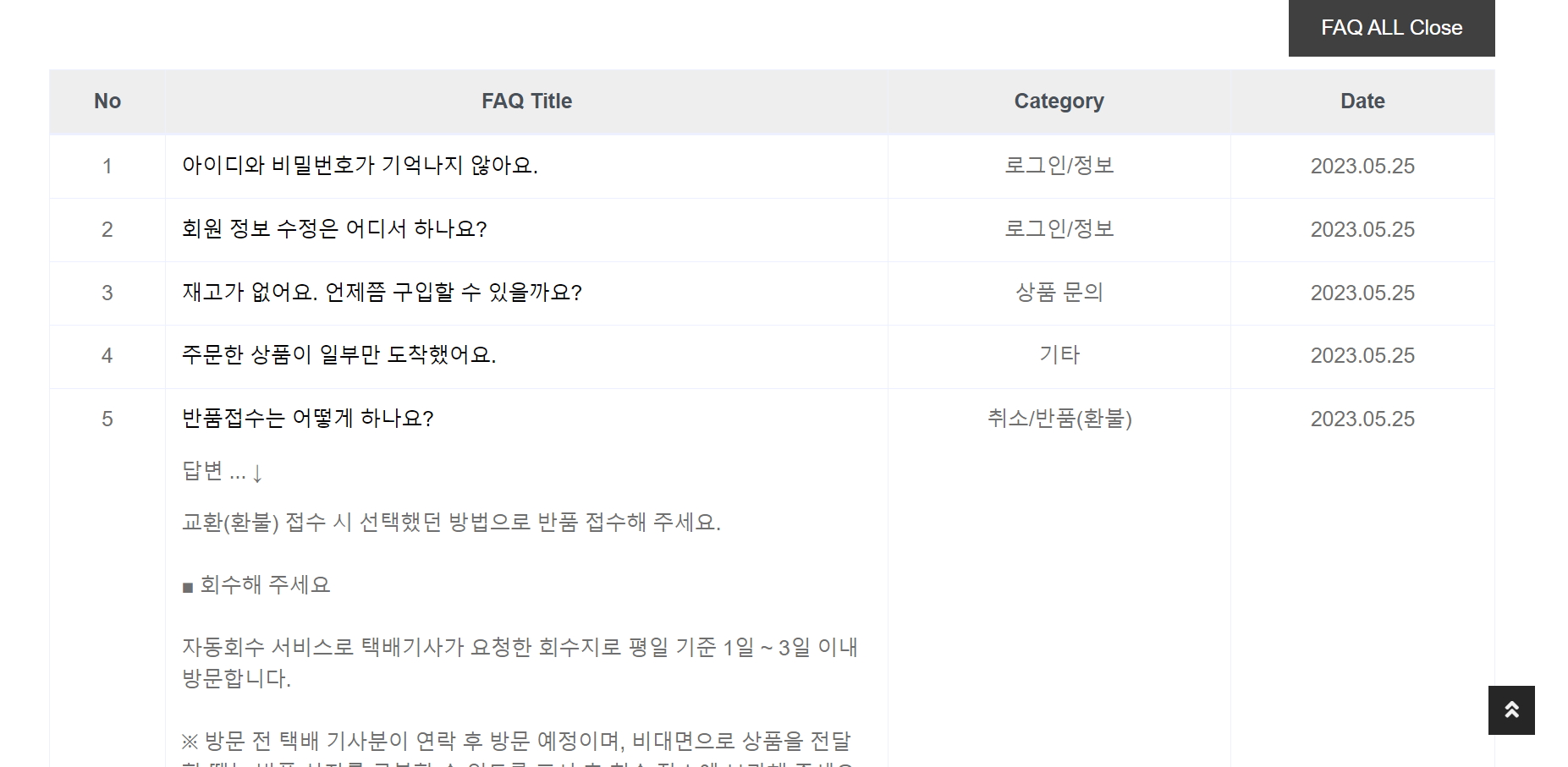
해당 페이지는 자주 묻는 질문을 모아 회원들이 볼 수 있게 기본적인 정보를 제공한다.
qna.jsp 추가
<%@ page language="java" contentType="text/html; charset=utf-8" pageEncoding="utf-8"%>
<!DOCTYPE html>
<html>
<head>
<link rel="stylesheet" href="https://cdn.jsdelivr.net/npm/bootstrap@4.6.0/dist/css/bootstrap.min.css">
<jsp:include page="header.jsp"></jsp:include>
</head>
<style>
html, body {
font-family: Helvetica, Arial, sans-serif;
margin: 0;
}
.panel-faq-container {
margin-bottom: -16px;
}
.panel-faq-title {
color: #000000;
cursor: pointer;
}
.panel-faq-answer {
height: 0;
overflow: hidden;
/* 변화가 시작되는 쪽에다가 transition 적용해준다 0 -> 300px
왜? 닫기 버튼을 누를 때 변화가 티남 */
transition: all 1s;
}
#btn-all-close {
margin-bottom: 10px;
background-color: #404040;
border: none;
color: #fff;
cursor: pointer;
padding: 10px 25px;
float: right;
}
#btn-all-close:hover {
background-color: #D9D9D9;
color: #000;
transition: all 0.35s;
}
.active {
display: block;
/* 높이를 정해줘야지만 transition이 적용됨 */
height: 1000px;
}
</style>
<body>
<hr>
<div class="container bg-secondary mb-3" style="max-width: 800px;">
<div class="d-flex flex-column align-items-center justify-content-center" style="min-height: 200px">
<h1 class="font-weight-semi-bold text-uppercase mb-3">FAQ <small class="text-muted">자주 묻는 질문</small></h1>
<div class="d-inline-flex">
<p class="m-0">
<a href="/">Home</a>
</p>
</div>
</div>
</div>
<div class="container">
<button id="btn-all-close">FAQ ALL Close</button>
<br>
<table class="table table-bordered table-hover">
<thead class="thead-light text-center">
<tr>
<th>No</th>
<th>FAQ Title</th>
<th>Category</th>
<th>Date</th>
</tr>
</thead>
<tbody class="text-center">
<tr>
<td>1</td>
<td class="text-left" width="50%">
<div class="panel-faq-container">
<p class="panel-faq-title">아이디와 비밀번호가 기억나지 않아요.</p>
<div class="panel-faq-answer" style="max-height: 600px;">
<p>답변 ... ↓</p>
<p>
로그인 화면에서 아이디 찾기/비밀번호 찾기를 통해 확인 가능합니다.<br> <br> 아이디 찾기는 아래 3가지 방법 중 하나로 진행해 주세요.<br> <br> <br> <br> ■ 휴대전화<br> <br> 회원 정보에 등록된 본인의 휴대전화 번호를 인증하는 방법입니다.<br> <br> ■ 이메일<br> <br> 회원 정보에 등록된 본인의 이메일 주소를 인증하는 방법입니다.<br> <br> ■ 본인인증<br> <br> 이용 중인 통신사와 휴대전화 번호를 인증하는 방법입니다.<br> <br> ※ 비밀번호 재설정을 완료한 휴면 회원은 휴면 해제 및 탈퇴 신청이 취소됩니다.<br> <br> ※ 비밀번호 찾기는 휴대전화 본인 인증으로만 가능합니다.
</div>
</div>
</td>
<td>로그인/정보</td>
<td>2023.05.25</td>
</tr>
<tr>
<td>2</td>
<td class="text-left" width="50%">
<div class="panel-faq-container">
<p class="panel-faq-title">회원 정보 수정은 어디서 하나요?</p>
<div class="panel-faq-answer" style="max-height: 600px;">
<p>답변 ... ↓</p>
<p>
회원 정보 수정은 아래 경로로 직접 변경 가능합니다. <br> <br> <br> <br> ■ 회원 정보 수정 <br> <br> 모바일(앱/웹) : 마이페이지 > 내 정보 관리 > 오른쪽 위 톱니바퀴<br> <br> PC(웹) : 마이페이지 > 회원정보 변경<br> <br> ※ 원활한 주문 및 배송을 위해 회원 정보를 정확하게 기재해 주세요.<br> <br> ■ 이름 개명 시 수정<br> <br> 모바일(앱/웹) : 마이페이지 > 내 정보 관리 > 오른쪽 위 톱니바퀴 > 회원 정보 > 이름/휴대전화/생년월일<br> <br> PC(웹) : 마이페이지 > 회원정보 변경 > 이름수정<br> <br> ※ 개명한 이름이 NICE 평가 정보에 등록되어 있어야 합니다.<br> <br> ※ 본인인증을 통해 NICE 평가 정보 적용된 이름(실명)을 기준으로 변경됩니다.<br> <br>
</div>
</div>
</td>
<td>로그인/정보</td>
<td>2023.05.25</td>
</tr>
<tr>
<td>3</td>
<td class="text-left" width="50%">
<div class="panel-faq-container">
<p class="panel-faq-title">재고가 없어요. 언제쯤 구입할 수 있을까요?</p>
<div class="panel-faq-answer" style="max-height: 400px;">
<p>답변 ... ↓</p>
<p>
품절 상품 재입고 여부 및 일정은 정확한 확인이 가능하지 않지만 재입고 알림을 등록하면 알림톡으로 확인 할 수 있습니다. <br> <br> 알림 신청 방법은 아래내용을 확인해 주세요.<br> <br> ■ 재입고 알림 신청 <br> <br> 모바일(앱) : 상품 선택 > 구매하기 > 재입고 알림 받기 선택<br> <br> ※ 재입고 알림 신청은 APP에서만 신청이 가능합니다.<br> <br> ※ 재고 입고 수량에서 요청순서에 따라 순차적으로 발송 됩니다.<br> <br> ※ 재입고 알림 버튼이 보이지 않거나 재입고 관련 상세확인은 상품 페이지의 상품문의를 이용해 주세요.<br> <br>
</div>
</div>
</td>
<td>상품 문의</td>
<td>2023.05.25</td>
</tr>
<tr>
<td>4</td>
<td class="text-left" width="50%">
<div class="panel-faq-container">
<p class="panel-faq-title">주문한 상품이 일부만 도착했어요.</p>
<div class="panel-faq-answer" style="max-height: 400px;">
<p>답변 ... ↓</p>
<p>
브랜드 및 상품에 따라 출고지가 다르기 때문에 여러 개 상품을 주문한 경우에는 각각 배송이 됩니다. <br> <br> 브랜드가 달라도 상품 주문 시 한 번에 결제할 수 있습니다. <br> <br> <br> <br> 아직 도착하지 않는 상품은 아래 경로에서 배송진행 상황을 확인해 주세요. <br> <br> <br> <br> ■ 배송 조회 경로<br> <br>
<a href="/user/myPurchased?userid=${user.userid }">
<span style="color: #3498db;">
<strong>마이페이지 > 배송 중/픽업 대기 > 배송조회</strong>
</span>
</a>
<br> <br> <br> <br>
<a href="#">
<span style="color: #3498db;">
<strong>[배송조회 FAQ 바로 가기]</strong>
</span>
</a>
<br> <br>
</p>
</div>
</div>
</td>
<td>기타</td>
<td>2023.05.25</td>
</tr>
<tr>
<td>5</td>
<td class="text-left" width="50%">
<div class="panel-faq-container">
<p class="panel-faq-title">반품접수는 어떻게 하나요?</p>
<div class="panel-faq-answer" style="max-height: 600px;">
<p>답변 ... ↓</p>
<p>
교환(환불) 접수 시 선택했던 방법으로 반품 접수해 주세요.<br> <br> ■ 회수해 주세요<br> <br> 자동회수 서비스로 택배기사가 요청한 회수지로 평일 기준 1일 ~ 3일 이내 방문합니다. <br> <br> ※ 방문 전 택배 기사분이 연락 후 방문 예정이며, 비대면으로 상품을 전달할 때는 반품 상자를 구분할 수 있도록 표시 후 회수 장소에 보관해 주세요.<br> <br> ■ 직접 발송했어요<br> <br> 상품을 받은 택배사와 같은 택배사로 고객님께서 직접 반품 예약을 해주셔야 합니다.<br> <br> 상품 회수 완료 시 반송장 정보를 입력해 주세요.<br> <br> ※ 계약된 택배사가 아닌 다른 택배사 이용 시 추가 비용 발생할 수 있고 2개 이상의 브랜드 반송 시, 각각 반송지로 보내주세요.<br> <br> ※ 안내서에 배송비 동봉 등에 대한 내용이 있더라도, 동봉하면 안 됩니다.<br> <br>
</div>
</div>
</td>
<td>취소/반품(환불)</td>
<td>2023.05.25</td>
</tr>
<tr>
<td>6</td>
<td class="text-left" width="50%">
<div class="panel-faq-container">
<p class="panel-faq-title">상품이 불량인 것을 착용하고나서 확인했어요 어떻게 하나요?</p>
<div class="panel-faq-answer" style="max-height: 400px;">
<p>답변 ... ↓</p>
<p>
착용 후 불량 확인 시에는 초기 불량 여부 확인이 어려워 교환 및 환불이 가능하지 않습니다.<br> <br> <br> <br> * 브랜드 측으로 AS 가능 여부 확인 후 AS 처리 진행이 가능합니다.<br> <br> * 미 착용 상태에서 불량 확인 시, 무상으로 환불 및 교환 처리가 가능합니다.<br> <br> <br> <br>
<a href="">
<span style="color: #3498db;">
<strong>[AS FAQ 바로 가기]</strong>
</span>
</a>
</p>
</div>
</div>
</td>
<td>AS</td>
<td>2023.05.25</td>
</tr>
<tr>
<td>7</td>
<td class="text-left" width="50%">
<div class="panel-faq-container">
<p class="panel-faq-title">상품은 전부 정품인가요?</p>
<div class="panel-faq-answer">
<p>답변 ... ↓</p>
<p>
상품은 아래의 정품 감정(인증) 프로세스를 거쳐 정품만을 판매합니다. <br> <br> ■ 부티크 상품 정품 감정(인증) 프로세스 <br> 1. 상품 매입 <br> - 브랜드로부터 직소싱 및 해외 유명 부티크로부터의 직매입 등 신뢰할 수 있는 업체와의 제휴
<br> - 병행 상품을 제외한 전 상품을 물류센터로 매입하여 입고부터 배송까지 전 과정 관리 진행 <br> <br> 2. 통관 및 입고 <br> - 상품 항공 하역 후 통관 작업 진행<br> - 숙련된 내부 인력에 의해 상품 수량, 파손, 불량 체크 등 1차적인 기초 검수 진행
<br> <br> 3. 전문기관 사전 검수 <br> - 한국 명품 감정원 및 TIPA(무역 관련 지식 재산권 보호 협회)와 공식 제휴 <br> - 공신력 있는 전문 감정기관에 의한 전 상품 정/가품 여부 확인 및 상세 검수 진행 <br>
<br> 4. 출고 및 배송 <br> - 상품 컨디션 및 구성품 최종 검수 후 정품임을 인증하는 보안 실 부착 <br> - 가 직접 검수한 정품임을 인증하는 인증서 동봉 후 상품 배송 <br> <br> 5. 정품 감정 문의 <br> - 상품 수령 후 가품 의심 또는 정품 감정을 희망하시는 경우 고객센터로 연락 주시면 도움드리겠습니다. <br> ※ 가품 발생시 판매가의 최대 200%를 보상해 드립니다.<br> ※ 상품 바꿔치기
등의 방법으로 허위 신고를 하는 경우 민형사상 처벌 및 손해배상이 청구될 수 있습니다. <br> ※ 정품 인증서 누락 및 보안 실이 제거된 경우, 부티크 상품으로 인정되지 않을 수 있으며 이에 따라 교환/환불 및 정품 문의가 지원되지 않습니다. <br> (정품 인증서 관련 사항은 9월 13일부터 변경되어, 2022년 9월 13일 이전 구매 회원의 경우 보안 실 동봉시 감정 진행이 가능합니다.)<br> <br>
</div>
</div>
</td>
<td>상품 문의</td>
<td>2023.05.25</td>
</tr>
<tr>
<td>8</td>
<td class="text-left" width="50%">
<div class="panel-faq-container">
<p class="panel-faq-title">쿠폰은 어떻게 사용하나요?</p>
<div class="panel-faq-answer" style="max-height: 400px;">
<p>답변 ... ↓</p>
<p>
보유한 쿠폰은 주문 결제 시 적용 가능 상품 확인 및 사용이 가능합니다.<br> 주문 완료 후에는 쿠폰 적용이 가능하지 않습니다.<br> *환불 완료 시 유효기간이 종료되지 않은 쿠폰은 반환되며 유효기간 내에 재사용 가능합니다.<br> <br>
<a href="/user/myCoupon?userid=${user.userid }">
<span style="color: #3498db;">
<strong>보유 쿠폰 확인하기 </strong>
</span>
</a>
</p>
</div>
</div>
</td>
<td>혜택</td>
<td>2023.05.25</td>
</tr>
<tr class="bg-muted">
<td colspan=4 class="text-center">이 외의 문의 사항은 Contact의 고객센터를 이용하여 주시기 바랍니다.</td>
</tr>
</tbody>
</table>
</div>
<hr>
<script>
window.onload = () => {
// panel-faq-container
const panelFaqContainer = document.querySelectorAll(".panel-faq-container"); // NodeList 객체
// panel-faq-answer
let panelFaqAnswer = document.querySelectorAll(".panel-faq-answer");
// btn-all-close
const btnAllClose = document.querySelector("#btn-all-close");
// 반복문 순회하면서 해당 FAQ제목 클릭시 콜백 처리
for( let i=0; i < panelFaqContainer.length; i++ ) {
panelFaqContainer[i].addEventListener('click', function() { // 클릭시 처리할 일
// FAQ 제목 클릭시 -> 본문이 보이게끔 -> active 클래스 추가
panelFaqAnswer[i].classList.toggle('active');
});
};
btnAllClose.addEventListener('click', function() {
// 버튼 클릭시 처리할 일
for(let i=0; i < panelFaqAnswer.length; i++) {
panelFaqAnswer[i].classList.remove('active');
};
});
}
</script>
</body>
<jsp:include page="footer.jsp"></jsp:include>
</html>
해당 페이지는 무신사의 qna 페이지를 참고하였다.
header.jsp 에 수정
<a href="/qna" class="nav-item nav-link">Q&A</a>
HomeController.java 에 추가
	// qna 페이지
    @GetMapping("/qna")
    public void qnaGET() {
       logger.info("qna 페이지 진입");
    }
2. Contact 페이지
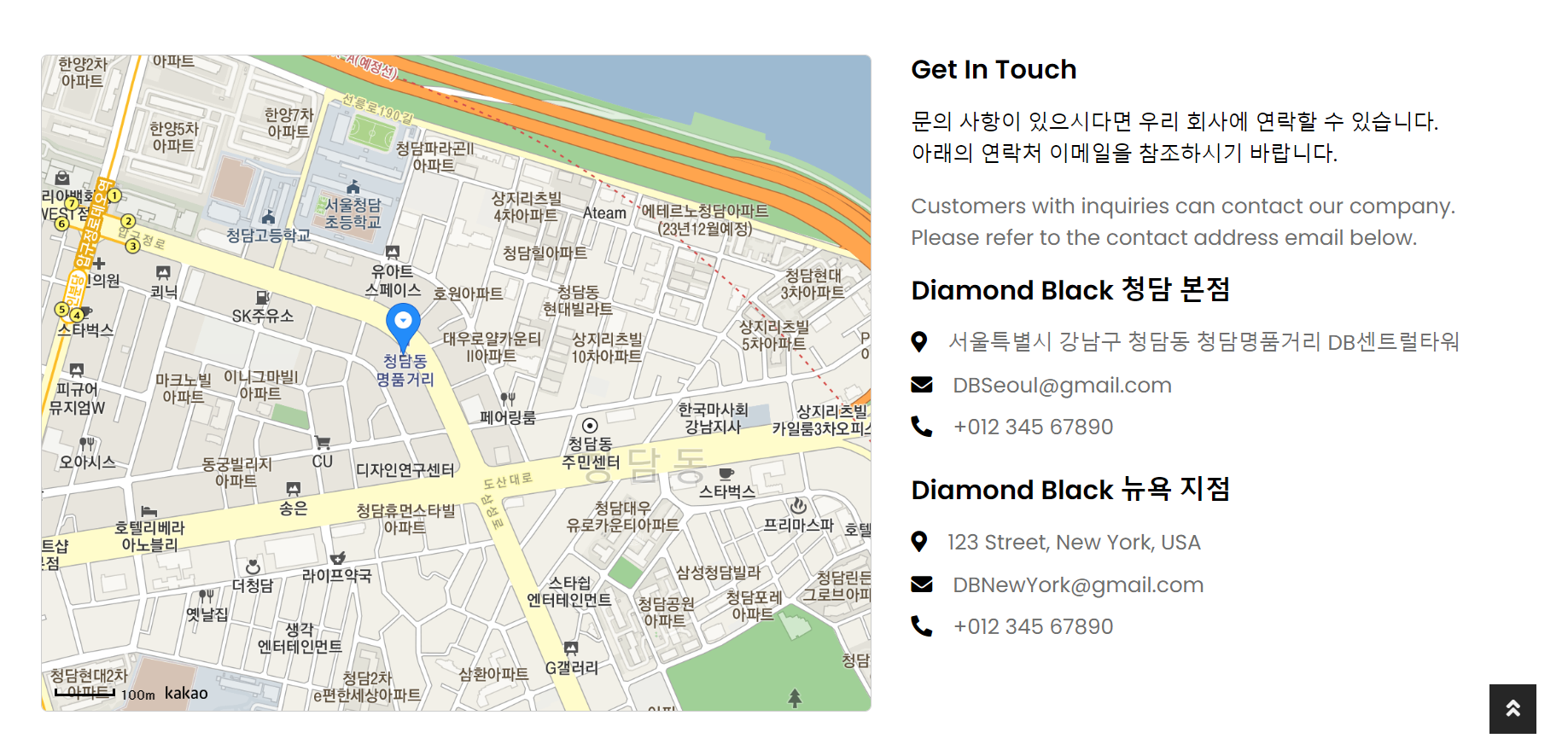
해당 페이지는 회사의 정보를 회원들에게 제공한다.
contact.jsp 추가
<%@ page language="java" contentType="text/html; charset=utf-8" pageEncoding="utf-8"%>
<!DOCTYPE html>
<html>
<head>
<script type="text/javascript" src="//dapi.kakao.com/v2/maps/sdk.js?appkey=7c08c0b2cb98f2f810f7bd59e7c4de63&libraries=services,clusterer,drawing"></script>
<jsp:include page="header.jsp"></jsp:include>
</head>
<body>
	<hr>
	<!-- Page Header Start -->
	<div class="container bg-secondary mb-3" style="max-width: 800px;">
		<div class="d-flex flex-column align-items-center justify-content-center" style="min-height: 200px">
			<h1 class="font-weight-semi-bold text-uppercase mb-3">Contact Us</h1>
			<div class="d-inline-flex">
				<p class="m-0">
					<a href="/">Home</a>
				</p>
			</div>
		</div>
	</div>
	<!-- Page Header End -->
	<!-- Contact Start -->
	<div class="container-fluid pt-5">
		<div class="row px-xl-5">
			<div class="col-lg-7 mb-5">
				<div class="contact-form">
					<div id="success"></div>
					<form name="sentMessage" id="contactForm" novalidate="novalidate">
						<div class="row">
							<div class="col-md-12">
								<div id="map" style="height: 500px; border: 1px solid #ccc; border-radius: 5px; background-color: #f8f9fa;"></div>
							</div>
						</div>
						<script type="text/javascript" src="//dapi.kakao.com/v2/maps/sdk.js?appkey=7c08c0b2cb98f2f810f7bd59e7c4de63"></script>
						<script>
							var mapContainer = document.getElementById('map'), mapOption = {
								center : new kakao.maps.LatLng(
										37.526028933993665, 127.04603780540681),
								level : 3
							};
							var map = new kakao.maps.Map(mapContainer,
									mapOption);
							var markerPosition = new kakao.maps.LatLng(
									37.526028933993665, 127.04603780540681);
							var marker = new kakao.maps.Marker({
								position : markerPosition
							});
							marker.setMap(map);
						</script>
					</form>
				</div>
			</div>
			<div class="col-lg-5 mb-5">
				<h5 class="font-weight-semi-bold mb-3">Get In Touch</h5>
				<p class="text-primary">
					문의 사항이 있으시다면 우리 회사에 연락할 수 있습니다. <br> 아래의 연락처 이메일을 참조하시기 바랍니다.
				</p>
				<p>Customers with inquiries can contact our company. Please refer to the contact address email below.</p>
				<div class="d-flex flex-column mb-3">
					<h5 class="font-weight-semi-bold mb-3">Diamond Black 청담 본점</h5>
					<p class="mb-2">
						<i class="fa fa-map-marker-alt text-primary mr-3"></i>서울특별시 강남구 청담동 청담명품거리 DB센트럴타워
					</p>
					<p class="mb-2">
						<i class="fa fa-envelope text-primary mr-3"></i>DBSeoul@gmail.com
					</p>
					<p class="mb-2">
						<i class="fa fa-phone-alt text-primary mr-3"></i>+012 345 67890
					</p>
				</div>
				<div class="d-flex flex-column">
					<h5 class="font-weight-semi-bold mb-3">Diamond Black 뉴욕 지점</h5>
					<p class="mb-2">
						<i class="fa fa-map-marker-alt text-primary mr-3"></i>123 Street, New York, USA
					</p>
					<p class="mb-2">
						<i class="fa fa-envelope text-primary mr-3"></i>DBNewYork@gmail.com
					</p>
					<p class="mb-0">
						<i class="fa fa-phone-alt text-primary mr-3"></i>+012 345 67890
					</p>
				</div>
			</div>
		</div>
	</div>
	<!-- Contact End -->
	<hr>
</body>
<jsp:include page="footer.jsp"></jsp:include>
</html>
카카오 지도 API 스크립트를 사용 해준다.
원하는 위치의 좌표값을 넣으면 된다.
header.jsp 에 수정
<a href="/contact" class="nav-item nav-link">Contact</a>
HomeController.java 에 추가
	// Contact 페이지
	@GetMapping("/contact")
	public void contactGET() {
		logger.info("contact 페이지 진입");
	}