사용한 플랫폼 : Spring, Oracle
1. 장바구니 담기
com.db.model 에 CartVO 추가
package com.db.model;

import java.sql.Timestamp;

import lombok.Data;

@Data
public class CartVO {
	private int cartnum;
	private String userid;
	private int num;
	private String psize;
	private int quantity;
	private int price;
	private Timestamp orderdate;
	private int result;
}
Product table에 상품의 고유 가격이 있지만, 할인율이 임의로 설정된 상품이나 Auction(경매)에 임의로 정해질 가격이 기존의 상품 가격과 달라지기 때문에 price 컬럼을 따로 저장할 수 있게 추가 해 주었다.
ProductController.java 에 추가
	// 장바구니에 상품 추가
	@PostMapping("/addCart")
	@ResponseBody
	public ResponseEntity<?> addCartPOST(String userid, CartVO cart, HttpServletRequest request, HttpSession session)
			throws Exception {

		productService.addCart(cart); // 장바구니 추가 쿼리 실행

		return ResponseEntity.ok("Success");
	}
상품디테일 페이지에서 Ajax를 사용해 비동기로 장바구니 추가 메서드를 작동 시기위해 @ResponseBody 어노테이션을 사용한다.
ResponseEntity<?> 는 자바의 제네릭 타입을 사용하여 응답 본문의 내용을 자유롭게 표현할 수 있다. ? 는 다양한 종류 데이터를 반환 할 수 있기때문에 사용하였다.
ProductMapper.java 에 추가
	// 장바구니 상품 추가
	public CartVO addCart(CartVO cart);
ProductService.java 에 추가
	// 장바구니 상품 추가
	public CartVO addCart(CartVO cart) throws Exception;
ProductServiceImpl.java 에 추가
	@Override
	public CartVO addCart(CartVO cart) throws Exception {

		return productmapper.addCart(cart);

	}
ProductMapper.xml 에 추가
	<!-- 장바구니 상품 추가 -->
	<select id="addCart" resultType="com.db.model.CartVO">

		insert into cart(cartnum,
		userid, num, psize, quantity, price)
		values (cart_seq.nextval,
		#{userid}, #{num}, #{psize}, #{quantity},
		#{price})

	</select>
productDetail.jsp 에 스크립트 추가
<script>
		function validateForm() {
			var psize = $('input[name="psize"]:checked').val();
			if (!psize) {
				alert("사이즈를 선택해주세요");
				return false;
			}

			// form data
			var formData = $("form[name='addcart']").serialize();

			// AJAX request
			$.ajax({
				type : "POST",
				url : "/product/addCart",
				data : formData,
				success : function(response) {
					alert("장바구니에 추가되었습니다.");
					location.reload(); // 페이지 새로 고침
				},
				error : function(xhr, status, error) {
					alert("장바구니에 추가하는 데 실패했습니다.");
					location.reload(); // 페이지 새로 고침
				}
			});
			return false;
		}
	</script>
장바구니 추가 메소드를 실행하고 해당 페이지를 새로고침 한다.
2. 장바구니 뱃지 숫자 표기
ProductController.java 에 추가
	// 장바구니 뱃지 상품 개수
	@GetMapping("/countCartAjax")
	@ResponseBody
	public String countCartAjax(String userid) throws Exception {
		return String.valueOf(productService.countCart(userid));
	}
ProductMapper.java 에 추가
	// 장바구니 상품 갯수 불러오기
	public int countCart(String userid);
ProductService.java 에 추가
	// 장바구니 상품 갯수 불러오기
	public int countCart(String userid) throws Exception;
ProductServiceImpl.java 에 추가
	@Override
	public int countCart(String userid) throws Exception {

		return productmapper.countCart(userid);
	}
ProductMapper.xml 에 추가
	<!-- 장바구니 상품 갯수 불러오기 -->
	<select id="countCart" resultType="int" parameterType="String">
		SELECT
		COUNT(*) FROM cart WHERE userid = #{userid} and result ='1'
	</select>
result = ‘1’ 은 아직 결제를 진행 하지 않은 상태이다.
결제 시 result 가 0으로 바뀌어 장바구니 페이지나 뱃지에 나오지 않게 만든다.
3. 나의 장바구니 불러오기
ProductController.java 에 추가
	// 나의 장바구니
	@GetMapping("/myCart")
	public String myCartGET(String userid, HttpServletRequest request, HttpSession session) throws Exception {

		ArrayList<CartVO> clist = productService.getCartList(userid); // userid로 장바구니 리스트 불러오기
		request.setAttribute("clist", clist);

		ArrayList<ProductVO> plist = productService.getAllProduct(); // 모든 상품 가져오기
		request.setAttribute("plist", plist);

		return "/product/cart";

	}
Cart table의 num(상품 번호)와 Product table 의 num이 FK로 연결 되어있어, 모든 상품 리스트를 불러온 후 장바구니의 num과 일치할 경우 장바구니 페이지에 해당 상품의 정보도 함께 출력해준다.
ProductMapper.java 에 추가
	// 장바구니 리스트 불러오기
	public ArrayList<CartVO> getCartList(String userid);

	// 모든 상품 정보 불러오기
	public ArrayList<ProductVO> getAllProduct();
ProductService.java 에 추가
	// 장바구니 리스트 불러오기
	public ArrayList<CartVO> getCartList(String userid) throws Exception;

	// 모든 상품 정보 불러오기
	public ArrayList<ProductVO> getAllProduct() throws Exception;
ProductServiceImpl.java 에 추가
	@Override
	public ArrayList<CartVO> getCartList(String userid) throws Exception {

		return productmapper.getCartList(userid);
	}

	@Override
	public ArrayList<ProductVO> getAllProduct() throws Exception {

		return productmapper.getAllProduct();
	}
ProductMapper.xml 에 추가
	<!-- 장바구니 리스트 불러오기 -->
	<select id="getCartList" resultType="com.db.model.CartVO">
		SELECT *
		FROM cart
		WHERE
		userId=#{userid} AND result='1'
		ORDER BY orderDate DESC
	</select>

		<!-- 모든 상품정보 불러오기 -->
	<select id="getAllProduct" resultType="com.db.model.ProductVO">

		select * from product

	</select>
cart.jsp 추가
<%@ page language="java" contentType="text/html; charset=utf-8" pageEncoding="utf-8"%>
<%@ taglib prefix="c" uri="http://java.sun.com/jsp/jstl/core"%>
<%@ taglib prefix="fmt" uri="http://java.sun.com/jsp/jstl/fmt"%>
<!DOCTYPE html>
<html>
<head>
<script src="https://ajax.googleapis.com/ajax/libs/jquery/3.5.1/jquery.min.js"></script>
</head>
<style>
td .delhidden {
	width: 100px
}

.delhide:hover .delhidden {
	display: block;
}

.delhide .delhidden {
	display: none;
}
</style>
<jsp:include page="../header.jsp"></jsp:include>
<body>
	<hr>
	<!-- Page Header Start -->
	<div class="container bg-secondary mb-3" style="max-width: 800px;">
		<div class="d-flex flex-column align-items-center justify-content-center" style="min-height: 200px">
			<h1 class="font-weight-semi-bold text-uppercase mb-3">Shopping Cart</h1>
			<div class="d-inline-flex">
				<p class="m-0">
					<a href="/">Home</a>
				</p>
			</div>
		</div>
	</div>
	<!-- Page Header End -->
	<!-- Cart Start -->
	<div class="container-fluid pt-5">
		<div class="row px-xl-5">
			<div class="col-lg-8 table-responsive mb-5">
				<table class="table table-bordered text-center mb-0" id="cartTable">
					<thead class="bg-secondary text-dark">
						<tr>
							<th>Products</th>
							<th>Size</th>
							<th>Price</th>
							<th>Quantity</th>
							<th>Total</th>
							<!-- 								<th>Remove</th> -->
						</tr>
					</thead>
					<tbody class="align-middle">
						<c:choose>
							<c:when test="${clist.size()==0}">
								<tr>
									<td class="align-middle" colspan="7">
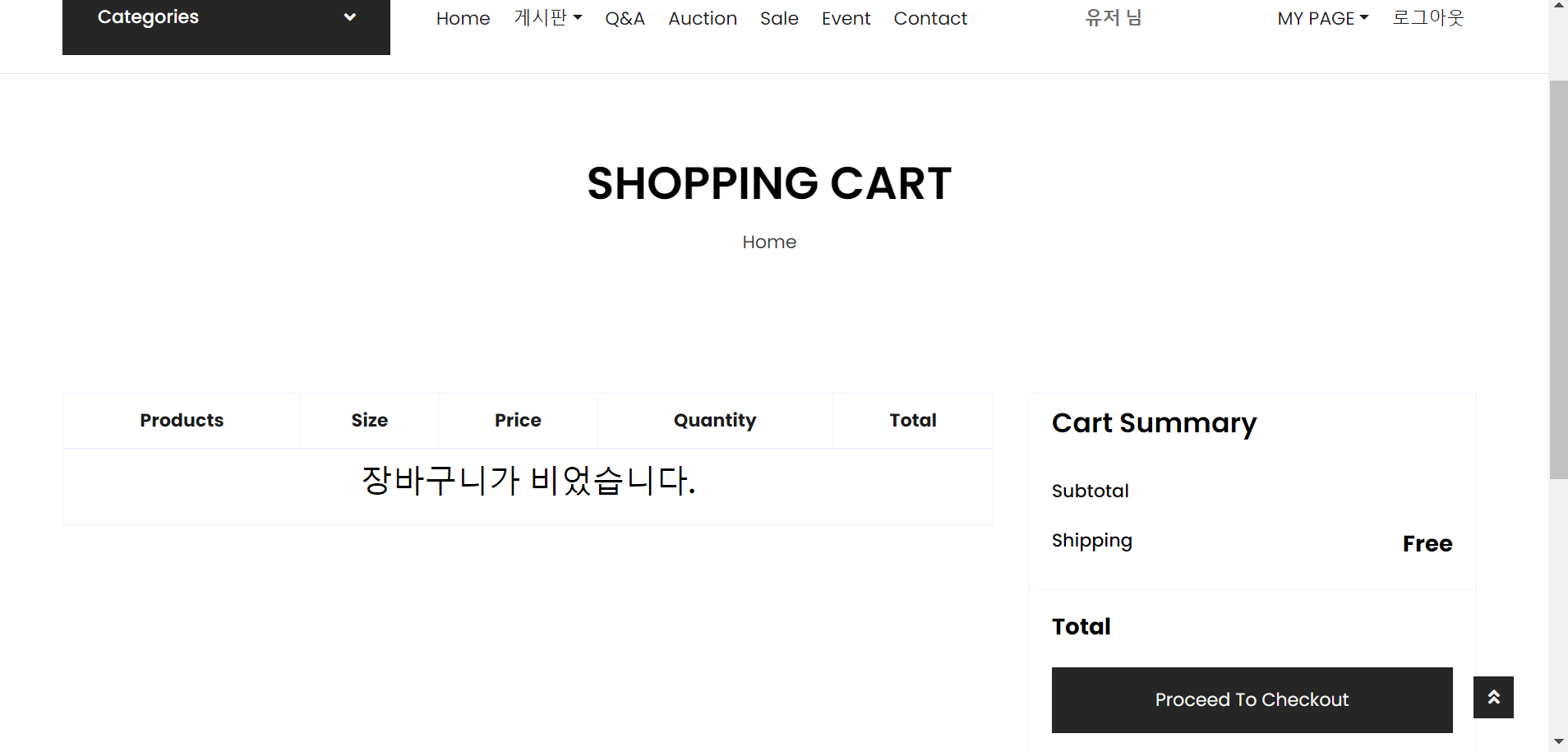
										<h3>장바구니가 비었습니다.</h3>
									</td>
								</tr>
							</c:when>
							<c:otherwise>
								<c:forEach var="cart" items="${clist}">
									<!-- 장바구니 cartVO -->
									<tr class="delhide">
										<c:forEach var="product" items="${plist }">
											<!-- 상품리스트 -->
											<c:if test="${cart.num == product.num}">
												<c:if test="${cart.result == 1}">
													<!--상품리스트품번과 장바구니 번호가 일치할 때  -->
													<td class="align-middle">
														<div class="d-flex align-items-center">
															<img src="../resources/img/${product.imgUrl}" alt="productImg" style="width: 55px; margin-right: 5px;">
															<div class="text-left">
																<a href='/product/productDetail?num=${product.num}&pname=${product.pname}'>${product.pname}</a>
															</div>
														</div>
													</td>
													<td class="align-middle"><c:choose>
															<c:when test='${cart.psize  =="S" }'>S</c:when>
															<c:when test='${cart.psize  =="M" }'>M</c:when>
															<c:when test='${cart.psize  =="L" }'>L</c:when>
															<c:when test='${cart.psize  =="XL" }'>XL</c:when>
															<c:when test='${cart.psize  =="XS" }'>XS</c:when>
															<c:when test='${cart.psize  =="XXL" }'>XXL</c:when>
															<c:when test='${cart.psize  =="Free" }'>Free</c:when>
														</c:choose></td>
													<td class="align-middle"><fmt:setLocale value="ko_KR" /> <fmt:formatNumber type="currency" value="${cart.price}" currencySymbol="₩" /></td>
													<td class="align-middle">
														<div class="input-group quantity mx-auto" style="width: 120px;">
															<div class="input-group-btn">
																<button class="btn btn-primary btn-minus" onclick="decreaseQuantity(${cart.cartnum})">
																	<i class="fa fa-minus"></i>
																</button>
															</div>
															<input type="text" style="height: 38.5px;" name="quantity" class="form-control form-control-sm bg-secondary text-center" value="${cart.quantity}" id="quantity-${cart.cartnum}" readonly>
															<div class="input-group-btn">
																<button class="btn btn-primary btn-plus" onclick="increaseQuantity(${cart.cartnum})">
																	<i class="fa fa-plus"></i>
																</button>
															</div>
															<c:set var="totalPrice" value="${cart.price * cart.quantity}" />
															<c:set var="subprice" value="${subprice + totalPrice}" />
														</div>
													</td>
													<td class="align-middle"><fmt:setLocale value="ko_KR" /> <fmt:formatNumber type="currency" value="${cart.price * cart.quantity}" currencySymbol="₩" /></td>
												</c:if>
											</c:if>
										</c:forEach>
									</tr>
								</c:forEach>
							</c:otherwise>
						</c:choose>
					</tbody>
				</table>
			</div>
			<div class="col-lg-4">
				<div class="card border-secondary mb-5">
					<div class="card-header bg-secondary border-0">
						<h4 class="font-weight-semi-bold m-0">Cart Summary</h4>
					</div>
					<div class="card-body">
						<div class="d-flex justify-content-between mb-3 pt-1">
							<h6 class="font-weight-medium">Subtotal</h6>
							<h6 class="font-weight-medium" id="subPrice">
								<fmt:setLocale value="ko_KR" />
								<fmt:formatNumber type="currency" value="${subprice}" currencySymbol="₩" />
							</h6>
						</div>
						<div class="d-flex justify-content-between">
							<h6 class="font-weight-medium">Shipping</h6>
							<h6 class="font-weight-medium">
								<strong style="font-size: 20px">Free</strong>
							</h6>
						</div>
					</div>
					<div class="card-footer border-secondary bg-transparent">
						<div class="d-flex justify-content-between mt-2">
							<h5 class="font-weight-bold">Total</h5>
							<h5 class="font-weight-bold" id="subPrice">
								<fmt:setLocale value="ko_KR" />
								<fmt:formatNumber type="currency" value="${subprice}" currencySymbol="₩" />
							</h5>
						</div>
						<c:if test="${clist.size()!=0}">
							<a href="#">
								<input type="button" class="btn btn-block btn-primary my-3 py-3" value="Proceed To Checkout">
							</a>
						</c:if>
						<c:if test="${clist.size()==0}">
							<a href="#" onclick="alert('주문할 상품이 없습니다.'); return false;">
								<input type="button" class="btn btn-block btn-primary my-3 py-3" value="Proceed To Checkout">
							</a>
						</c:if>
					</div>
				</div>
			</div>
		</div>
	</div>
	<!--Cart End -->
	<hr>
</body>
<jsp:include page="../footer.jsp"></jsp:include>
</html>
불러온 장바구니의 리스트가 비어있다면 결제 페이지로 넘어가지 않게 한다.
header.jsp 에 수정
<div class="col-lg-3 col-6 text-right">
				<c:if test="${user != null}">
					<div id="cart-badge">
						<a href="/product/myCart?userid=${user.userid}" class="btn border">
							<i class="fas fa-shopping-cart text-primary"></i>
							<span class="badge"></span>
						</a>
					</div>
				</c:if>
				<c:if test="${user == null}">
					<a class="btn border" onclick="alert('로그인 후에 이용이 가능합니다.'); return false;">
						<i class="fas fa-shopping-cart text-primary"></i>
						<span class="badge"></span>
					</a>
				</c:if>
			</div>
로그인이 안되어 있을 땐 장바구니 버튼이 작동되지 않게 만든다.
4. 장바구니 수량 증가 및 감소 & 삭제
Cart table에 저장된 quantity(수량)의 값이 보이는 값이 아니라 실제 서버에서 수량의 변동까지 저장 시키고, 따로 삭제 버튼을 만들어 삭제 하는것이 아닌 수량을 1미만으로 조정하려 할 때 장바구니에서 해당 상품을 삭제 시키게 만든다.
해당 버튼들 또한 Ajax를 이용하여 해당 페이지에서 비동기로 작동 시키게 만든다.
ProductController.java 에 추가
	// 장바구니 수량 감소
	@PostMapping("/quantityMinus")
	public ResponseEntity<String> decreaseQuantity(@RequestParam("cartnum") int cartnum) throws Exception {
		productService.decreaseQuantity(cartnum);
		return ResponseEntity.ok("Success");
	}

	// 장바구니 수량 증가
	@PostMapping("/quantityPlus")
	@ResponseBody
	public ResponseEntity<String> increaseQuantity(@RequestParam("cartnum") int cartnum) throws Exception {
		productService.increaseQuantity(cartnum);
		return ResponseEntity.ok("Success");
	}

	// 장바구니 상품 삭제
	@PostMapping("/deleteCart")
	@ResponseBody
	public ResponseEntity<String> cartDelete(@RequestParam("cartnum") int cartnum) throws Exception {
		productService.cartDelete(cartnum);
		return ResponseEntity.ok("Success");
	}
ProductMapper.java 에 추가
	// 장바구니 수량 감소
	public int decreaseQuantity(int cartnum);

	// 장바구니 수량 증가
	public int increaseQuantity(int cartnum);

	// 장바구니 상품 삭제
	public int cartDelete(int cartnum);
ProductService.java 에 추가
	// 장바구니 수량 감소
	public int decreaseQuantity(int cartnum) throws Exception;

	// 장바구니 수량 증가
	public int increaseQuantity(int cartnum) throws Exception;

	// 장바구니 상품 삭제
	public int cartDelete(int cartnum) throws Exception;
ProductServiceImpl.java 에 추가
	@Override
	public int decreaseQuantity(int cartnum) throws Exception {

		return productmapper.decreaseQuantity(cartnum);
	}

	@Override
	public int increaseQuantity(int cartnum) throws Exception {

		return productmapper.increaseQuantity(cartnum);
	}

	@Override
	public int cartDelete(int cartnum) throws Exception {

		return productmapper.cartDelete(cartnum);
	}
ProductMapper.xml 에 추가
	<!-- 장바구니 수량감소 -->
	<update id="decreaseQuantity">

		update cart SET quantity = quantity - 1
		where cartnum
		= #{carnum}

	</update>

	<!-- 장바구니 수량증가 -->
	<update id="increaseQuantity">

		update cart SET quantity = quantity + 1
		where cartnum
		= #{carnum}

	</update>

	<!-- 장바구니 상품삭제 -->
	<delete id="cartDelete">

		delete from cart where cartnum=#{cartnum}

	</delete>
cart.jsp 에 스크립트 추가
<script>
  function increaseQuantity(cartnum) {
    $.ajax({
      url: "/product/quantityPlus",
      method: "POST",
      data: {cartnum: cartnum},
      success: function (response) {
        console.log(response);
        location.reload(); // 페이지 새로 고침
      },
      error: function (error) {
        console.error(error);
      }
    });
  }
  function decreaseQuantity(cartnum) {
	    var currentQuantity = $("#quantity-" + cartnum).val();
	    if (currentQuantity <= 1) {
	      if (confirm("최소 수량 입니다.\n해당 상품을 장바구니에서 삭제 하시겠습니까?")) {
	        $.ajax({
	          url: "/product/deleteCart",
	          method: "POST",
	          data: {cartnum: cartnum},
	          success: function (response) {
	            console.log(response);
	            location.reload(); // 페이지 새로 고침
	          },
	          error: function (error) {
	            console.error(error);
	          }
	        });
	      } else {
	        return;
	      }
	    } else {
	      $.ajax({
	        url: "/product/quantityMinus",
	        method: "POST",
	        data: {cartnum: cartnum},
	        success: function (response) {
	          console.log(response);
	          location.reload(); // 페이지 새로 고침
	        },
	        error: function (error) {
	          console.error(error);
	        }
	      });
	    }
	  }
</script>