사용한 플랫폼 : Spring, Oracle
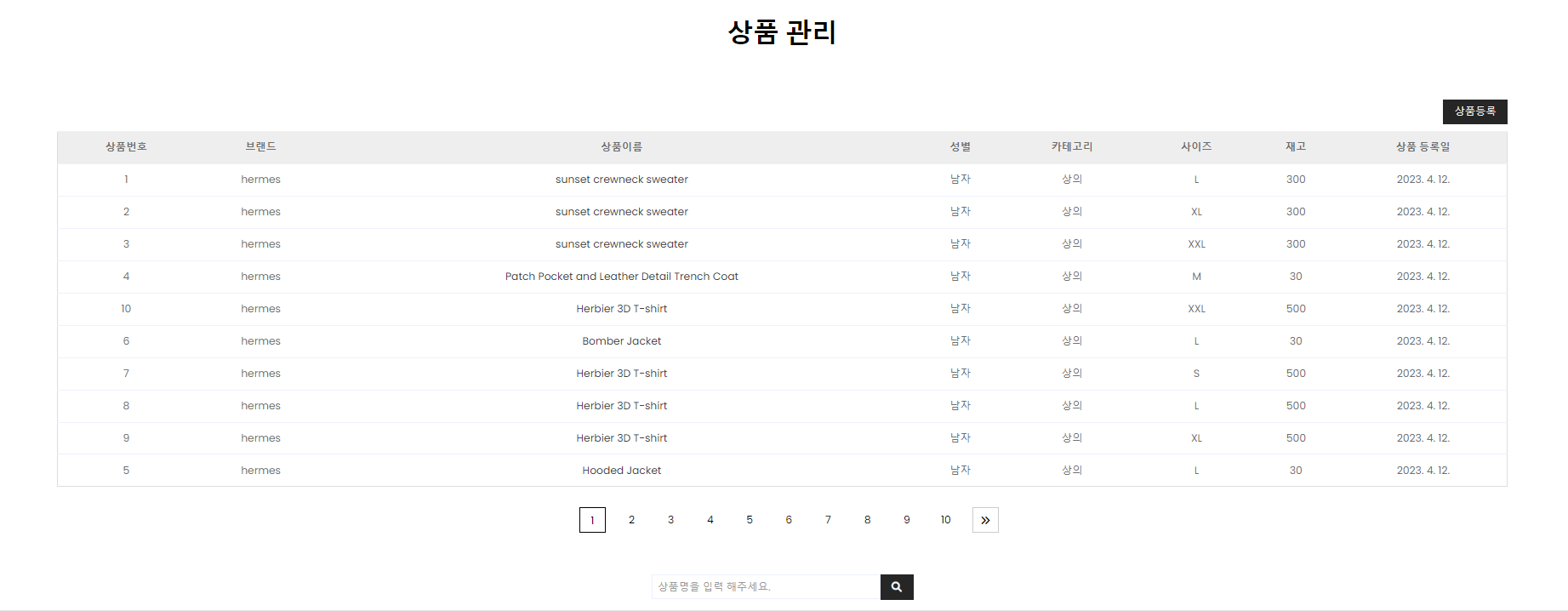
1. 상품 관리 리스트 페이지(페이징 처리 + 검색 기능)
AdminMapper.java 에 추가
	public List<ProductVO> getProductList(Criteria cri); // 등록된 상품 전체 가져오기

	public int productGetTotal(Criteria cri);// 등록된 상품의 수
AdminMapper.xml 에 추가
	<!-- 등록된 상품목록 전체 가져오기 -->
	<select id="getProductList" resultType="com.db.model.ProductVO">
		<![CDATA[
			select * from (
				select /*+INDEX_DESC(SYS_C008634)*/
					rownum as rn, num, bname, pname, pGender, kind, imgurl, psize, balance, price, explain, writedate, readcount, purchasedNum, discountrate
				from product
				where
				]]>
		<if test="keyword !=null">
			pname like '%'||#{keyword}||'%' and
		</if>
		<![CDATA[
			rownum <= #{pageNum}*#{amount}
			)
			where rn > (#{pageNum}-1)*#{amount}
			order by writedate desc
			]]>
	</select>

	<!-- 등록된 상품 갯수 가져오기 -->
	<select id="productGetTotal" resultType="int">
		select count(*) from product
		<if test="keyword!=null">
			where pname like '%' || #{keyword} || '%'
		</if>
	</select>
AdminService.java 에 추가
 public List<ProductVO> getProductList(Criteria cri); // 등록된 상품 전체 가져오기

 public int productGetTotal(Criteria cri);// 등록된 상품의 수
AdminServiceImpl.java 에 추가
	@Override
	public List<ProductVO> getProductList(Criteria cri) {
		return mapper.getProductList(cri);
	}

	@Override
	public int productGetTotal(Criteria cri) {
		return mapper.productGetTotal(cri);
	}
AdminController.java 에 추가
	// 상품 리스트
	@GetMapping("adminProductList")
	public void adminProductListGET(Criteria cri, Model model) {
		logger.info("adminController, adminProductListGET 진입 .... ");
		/* 상품 목록 출력 */
		List productList = adminService.getProductList(cri);
		model.addAttribute("productList", productList);

         /* 페이지 이동 인터페이스 데이터 */
		int total = adminService.productGetTotal(cri);
		PageMakerDTO pageMaker = new PageMakerDTO(cri, total);
		model.addAttribute("pageMaker", pageMaker);
    }
adminProductList.jsp 에 추가
<%@ page language="java" contentType="text/html; charset=UTF-8" pageEncoding="UTF-8"%>
<%@taglib prefix="c" uri="http://java.sun.com/jsp/jstl/core"%>
<%@taglib prefix="fmt" uri="http://java.sun.com/jsp/jstl/fmt"%>
<!DOCTYPE html>
<html>
<head>
<meta charset="UTF-8">
<title>Insert title here</title>
<link rel="stylesheet" type="text/css" href="../resources/css/adminTheme.css">
<meta content="width=device-width, initial-scale=1.0" name="viewport">
<!-- Google Web Fonts -->
<link rel="preconnect" href="https://fonts.gstatic.com">
<link href="https://fonts.googleapis.com/css2?family=Poppins:wght@100;200;300;400;500;600;700;800;900&display=swap" rel="stylesheet">
<!-- Font Awesome -->
<link href="https://cdnjs.cloudflare.com/ajax/libs/font-awesome/5.10.0/css/all.min.css" rel="stylesheet">
<!-- Libraries Stylesheet -->
<link href="../resources/css/owl.carousel.min.css" rel="stylesheet">
<!-- Customized Bootstrap Stylesheet -->
<link href="../resources/css/style.css" rel="stylesheet">
<!-- font-awesome -->
<link rel="stylesheet" href="https://cdnjs.cloudflare.com/ajax/libs/font-awesome/6.0.0/css/all.min.css" integrity="sha512-9usAa10IRO0HhonpyAIVpjrylPvoDwiPUiKdWk5t3PyolY1cOd4DSE0Ga+ri4AuTroPR5aQvXU9xC6qOPnzFeg==" crossorigin="anonymous" referrerpolicy="no-referrer" />
<style>
* {
	margin: 0 auto;
}

/* 페이지 버튼 인터페이스 */
.pageMaker_wrap {
	text-align: center;
	margin-top: 30px;
	margin-bottom: 40px;
}

.pageMaker_wrap a {
	color: black;
}

.pageMaker {
	list-style: none;
	display: inline-block;
}

.pageMaker_btn {
	float: left;
	width: 40px;
	height: 40px;
	line-height: 40px;
	margin-left: 20px;
}

.next, .prev {
	border: 1px solid #ccc;
	padding: 0 10px;
}

.active { /* 현재 페이지 버튼 */
	border: 2px solid black;
	font-weight: 400;
}
</style>
<script src="https://code.jquery.com/jquery-3.4.1.js" integrity="sha256-WpOohJOqMqqyKL9FccASB9O0KwACQJpFTUBLTYOVvVU=" crossorigin="anonymous"></script>
<jsp:include page="../header.jsp"></jsp:include>
</head>
<body>
	<hr>
	<div>
		<!-- Page Header Start -->
		<div class="container bg-secondary mb-3" style="max-width: 800px;">
			<div class="d-flex flex-column align-items-center justify-content-center" style="min-height: 150px">
				<h1 class="font-weight-semi-bold text-uppercase mb-3">상품 관리</h1>
				<p class="m-0">
					<!-- 					<a href="adminProductList">목록으로</a> -->
				</p>
			</div>
		</div>
	</div>
	<!-- Page Header End -->
	<div id="wrap">
		<div align="center" style="width: 90%">
			<div align="right" style="margin-bottom: 10px;">
				<button class="btn btn-primary px-3" onclick="location.href='/admin/adminProductWriteForm'">상품등록</button>
				<!-- 	<button class="btn btn-primary px-3">선택삭제</button>
				<button class="btn btn-primary px-3">전체삭제</button> -->
			</div>
			<div align="center">
				<table class="table" style="text-align: center; border: 1px solid #dddddd;">
					<thead>
						<tr>
							<!-- <th style="background-color: #eeeeee; text-align: center;">
							<input type="checkbox" class="individual_cart_checkbox input_size_20">
							</th> -->
							<th style="background-color: #eeeeee; text-align: center;">상품번호</th>
							<th style="background-color: #eeeeee; text-align: center;">브랜드</th>
							<th style="background-color: #eeeeee; text-align: center;">상품이름</th>
							<th style="background-color: #eeeeee; text-align: center;">성별</th>
							<th style="background-color: #eeeeee; text-align: center;">카테고리</th>
							<th style="background-color: #eeeeee; text-align: center;">사이즈</th>
							<th style="background-color: #eeeeee; text-align: center;">재고</th>
							<th style="background-color: #eeeeee; text-align: center;">상품 등록일</th>
						</tr>
					</thead>
					<tbody>
						<c:forEach items="${productList }" var="productList">
							<tr>
								<!-- <td>
									<input type="checkbox">
								</td> -->
								<td><c:out value="${productList.num }"></c:out></td>
								<td><c:out value="${productList.bname }"></c:out></td>
								<td><a class="move" href='<c:out value="${productList.num }"/>'>
										<c:out value="${productList.pname }"></c:out>
									</a></td>
								<td><c:if test="${productList.pGender==1 }">남자</c:if> <c:if test="${productList.pGender==2 }">여자</c:if> <c:if test="${productList.pGender==3 }">공용</c:if></td>
								<td><c:if test="${productList.kind==1 }">상의	</c:if> <c:if test="${productList.kind==2 }">하의	</c:if> <c:if test="${productList.kind==3 }">잡화	</c:if></td>
								<td><c:out value="${productList.psize }"></c:out></td>
								<td><c:out value="${productList.balance }"></c:out></td>
								<td><fmt:formatDate value="${productList.writedate  }" type="date" /></td>
							</tr>
						</c:forEach>
					</tbody>
				</table>
				<!-- 페이지 이동 인터페이스 영역 -->
				<div class="pageMaker_wrap">
					<ul class="pageMaker">
						<!-- 이전 버튼 -->
						<c:if test="${pageMaker.prev}">
							<li class="pageMaker_btn prev"><a href="${pageMaker.startPage - 1}">
									<i class="fa fa-angles-left"></i>
								</a></li>
						</c:if>
						<!-- 페이지 번호 -->
						<c:forEach begin="${pageMaker.startPage}" end="${pageMaker.endPage}" var="num">
							<li class="pageMaker_btn ${pageMaker.cri.pageNum == num ? "active":""}"><a href="${num}">${num}</a></li>
						</c:forEach>
						<!-- 다음 버튼 -->
						<c:if test="${pageMaker.next}">
							<li class="pageMaker_btn next"><a href="${pageMaker.endPage + 1 }">
									<i class="fa fa-angles-right"></i>
								</a></li>
						</c:if>
					</ul>
				</div>
				<!-- 페이징 끝  -->
				<!-- 검색 영역 -->
				<div class="search_wrap">
					<form id="searchForm" action="/admin/adminProductList" method="get">
						<div class="input-group" style="max-width: 400px;">
							<input type="text" placeholder="상품명을 입력 해주세요." class="form-control" name="keyword" style="width: 10%" value='<c:out value="${pageMaker.cri.keyword}"></c:out>'> <input type="hidden" name="pageNum" value='<c:out value="${pageMaker.cri.pageNum }"></c:out>'> <input type="hidden" name="amount" value='${pageMaker.cri.amount}'>
							<div class="input-group-append">
								<button class="btn btn-primary px-3">
									<i class="fa fa-search"></i>
								</button>
							</div>
						</div>
					</form>
				</div>
				<form id="moveForm" action="/admin/adminProductList" method="get">
					<input type="hidden" name="pageNum" value="${pageMaker.cri.pageNum}"> <input type="hidden" name="amount" value="${pageMaker.cri.amount}"> <input type="hidden" name="keyword" value="${pageMaker.cri.keyword}">
				</form>
			</div>
		</div>
	</div>
	<hr>
	<script>


		$(".table tbody tr").each(
				function() {
					var row = $(this);

					// Get the original price
					var goodsPriceText = row.find("td:eq(8)").text().trim();
					var goodsPrice = parseFloat(goodsPriceText.replace(
							/[^0-9.-]+/g, ""));

					// Get the discount rate
					var discountRateText = row.find("td:eq(9)").text().trim();
					var discountRate = parseFloat(discountRateText) / 100;

					// Calculate the discounted price
					var discountPrice = goodsPrice * (1 - discountRate);

					// Format the discounted price with the currency symbol
					var formattedDiscountPrice = '₩'
							+ new Intl.NumberFormat('ko-KR')
									.format(discountPrice.toFixed(0));

					// Set the formatted discounted price in the span_discount element
					row.find(".span_discount").text(formattedDiscountPrice);
				});

		let moveForm = $('#moveForm');

		/* 페이지 이동 버튼 */
		$(".pageMaker_btn a").on("click", function(e) {

			e.preventDefault();
			moveForm.find("input[name='pageNum']").val($(this).attr("href"));
			moveForm.submit();
		});

	</script>
</body>
<jsp:include page="../footer.jsp"></jsp:include>
</html>
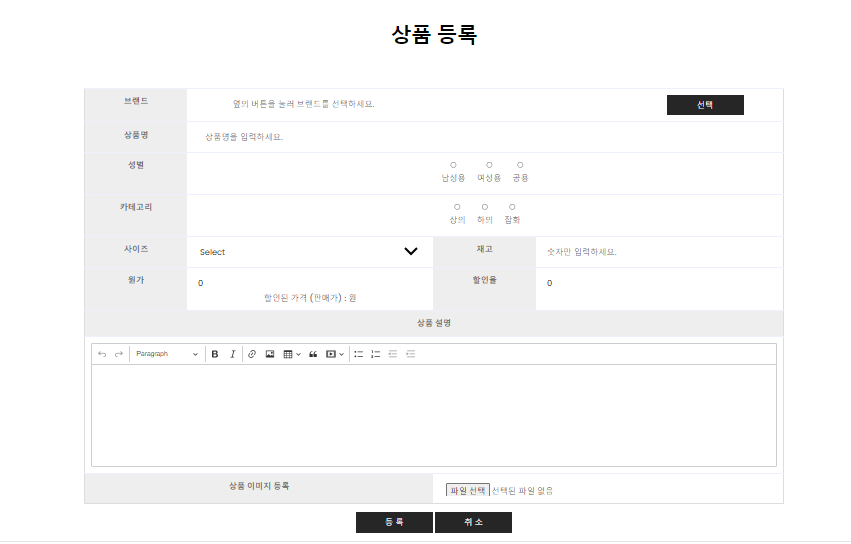
2. 상품 등록 기능
AdminController.java 에 추가
	// 상품 등록
	@GetMapping("adminProductWriteForm")
	public void adiminProductWriteFormGET() {
		logger.info("adminController, adminProductWriteForm 진입 ... ");
	}
adminProductWriteForm.jsp 추가
<%@ page language="java" contentType="text/html; charset=UTF-8" pageEncoding="UTF-8"%>
<%@ taglib prefix="c" uri="http://java.sun.com/jsp/jstl/core"%>
<%@ taglib prefix="fmt" uri="http://java.sun.com/jsp/jstl/fmt"%>
<!DOCTYPE html>
<html>
<head>
<meta charset="UTF-8">
<title>Insert title here</title>
<script src="https://cdn.ckeditor.com/ckeditor5/38.0.1/classic/ckeditor.js"></script>
<script src="https://code.jquery.com/jquery-3.4.1.js" integrity="sha256-WpOohJOqMqqyKL9FccASB9O0KwACQJpFTUBLTYOVvVU=" crossorigin="anonymous"></script>
<script src="//ajax.googleapis.com/ajax/libs/jquery/1.7.1/jquery.min.js"></script>
<script src="//code.jquery.com/ui/1.8.18/jquery-ui.min.js"></script>
<style>
.ck-content {
	height: 200px;
}

input {
	width: 98%;
	padding: 5px 1%;
	border: 0;
}

select {
	width: 98%;
	padding: 5px 1%;
	border: 0;
}

tr th td {
	vertical-align: middle;
	border-collapse: collapse;
}

.step_val { /* 할인 가격 문구 */
	padding-top: 5px;
	font-weight: 500;
}

.ck_warn { /* 입력란 공란 경고 태그 */
	display: none;
	padding-top: 10px;
	text-align: center;
	color: #e05757;
	font-weight: 300;
}

#result_card img {
	max-width: 100%;
	height: auto;
	display: block;
	padding: 5px;
	margin-top: 10px;
	margin: auto;
}

#result_card {
	position: relative;
}

.imgDeleteBtn {
	position: absolute;
	top: 0;
	right: 5%;
	background-color: #ef7d7d;
	color: wheat;
	font-weight: 900;
	width: 30px;
	height: 30px;
	border-radius: 50%;
	line-height: 26px;
	text-align: center;
	border: none;
	display: block;
	cursor: pointer;
}
</style>
<meta content="width=device-width, initial-scale=1.0" name="viewport">
<!-- Google Web Fonts -->
<link rel="preconnect" href="https://fonts.gstatic.com">
<link href="https://fonts.googleapis.com/css2?family=Poppins:wght@100;200;300;400;500;600;700;800;900&display=swap" rel="stylesheet">
<!-- Font Awesome -->
<link href="https://cdnjs.cloudflare.com/ajax/libs/font-awesome/5.10.0/css/all.min.css" rel="stylesheet">
<!-- Libraries Stylesheet -->
<link href="../resources/css/owl.carousel.min.css" rel="stylesheet">
<!-- Customized Bootstrap Stylesheet -->
<link href="../resources/css/style.css" rel="stylesheet">
<jsp:include page="../header.jsp"></jsp:include>
</head>
<body>
	<hr>
	<div>
		<!-- Page Header Start -->
		<div class="container bg-secondary mb-3" style="max-width: 800px;">
			<div class="d-flex flex-column align-items-center justify-content-center" style="min-height: 150px">
				<h1 class="font-weight-semi-bold text-uppercase mb-3">상품 등록</h1>
				<p class="m-0"></p>
			</div>
		</div>
	</div>
	<!-- Page Header End -->
	<!-- Shop Detail Start -->
	<div align="center">
		<form action="/admin/adminProductWriteForm" method="post" id="enrollForm" enctype="multipart/form-data">
			<table class="table" style="text-align: center; border: 1px solid #dddddd; width: 70%;">
				<tr>
					<th style="background-color: #eeeeee; text-align: center; width: 200px;">브랜드</th>
					<td colspan="4"><input id="bName_select" placeholder="옆의 버튼을 눌러 브랜드를 선택하세요." readonly="readonly" style="Width: 75%"> <input id="bName_input" name="bname" type="hidden">
						<button id="select_brand" class="btn btn-primary px-3" style="width: 150px">선택</button>
						<div>
							<span class="ck_warn bname_warn">브랜드를 선택해주세요.</span>
						</div></td>
				</tr>
				<tr>
					<th style="background-color: #eeeeee; text-align: center;">상품명</th>
					<td colspan="4"><input id="pnameId" name="pname" placeholder="상품명을 입력하세요.">
						<div>
							<span class="ck_warn pname_warn">등록하실 상품명을 입력해주세요.</span>
						</div></td>
				</tr>
				<tr>
					<th style="background-color: #eeeeee; text-align: center;">성별</th>
					<td colspan="4"><label> <input type="radio" name="pGender" value="1"> 남성용
					</label> <label> <input type="radio" name="pGender" value="2"> 여성용
					</label> <label> <input type="radio" name="pGender" value="3"> 공용
					</label>
						<div>
							<span class="ck_warn pGender_warn">등록하실 상품의 성별을 선택해주세요.</span>
						</div></td>
				</tr>
				<tr>
					<th style="background-color: #eeeeee; text-align: center;">카테고리</th>
					<td colspan="4"><label> <input type="radio" name="kind" value="1"> 상의
					</label> <label> <input type="radio" name="kind" value="2"> 하의
					</label> <label> <input type="radio" name="kind" value="3"> 잡화
					</label>
						<div>
							<span class="ck_warn kind_warn">등록하실 상품의 카테고리를 선택해주세요.</span>
						</div></td>
				</tr>
				<tr>
					<th style="background-color: #eeeeee; text-align: center;">사이즈</th>
					<td><select name="psize">
							<option value="" selected>Select</option>
							<option value="Free">Free</option>
							<option value="XS">XS</option>
							<option value="S">S</option>
							<option value="M">M</option>
							<option value="L">L</option>
							<option value="XL">XL</option>
							<option value="XXL">XXL</option>
					</select>
						<div>
							<span class="ck_warn psize_warn">등록하실 상품 사이즈를 선택해주세요.</span>
						</div></td>
					<th style="background-color: #eeeeee; text-align: center; width: 200px">재고</th>
					<td><input name="balance" type="number" placeholder="숫자만 입력하세요.">
						<div>
							<span class="ck_warn balance_warn">등록하실 상품의 재고를 입력해주세요.</span>
						</div></td>
				</tr>
				<tr>
					<th style="background-color: #eeeeee; text-align: center;">원가</th>
					<td><input name="price" type="number" value="0">
						<div>
							<span class="step_val">
								할인된 가격 (판매가) :
								<span class="span_discount"></span>
								원
							</span>
							<span class="ck_warn price_warn">등록하실 상품의 가격을 입력해주세요.</span>
						</div></td>
					<th style="background-color: #eeeeee; text-align: center; width: 200px">할인율</th>
					<td><input id="discount_interface" maxlength="2" value="0"> <input name="discountrate" type="hidden" value="0"></td>
				</tr>
				<tr>
					<th colspan="4" style="background-color: #eeeeee; text-align: center;">상품 설명</th>
				</tr>
				<tr>
					<td colspan="4">
						<div class="explainTextarea">
							<textarea name="explain" id="productExplainEditor"></textarea>
						</div>
						<div>
							<span class="ck_warn explain_warn">등록하실 상품의 설명을 입력해주세요.</span>
						</div>
					</td>
				</tr>
				<tr>
					<th colspan="2" style="background-color: #eeeeee; text-align: center;">상품 이미지 등록</th>
					<td colspan="4"><input type="file" multiple id="fileItem" name='uploadFile' style="height: 30px;"></td>
				</tr>
			</table>
		</form>
		<button class="btn btn-primary px-3" style="width: 150px" id="enrollBtn">등 록</button>
		<button class="btn btn-primary px-3" style="width: 150px" id="cancelBtn">취 소</button>
	</div>
	<hr>
	<script>
	let enrollForm=$("#enrollForm");

	/*위지윅*/
	/*상품설명 등록 */
	ClassicEditor
		.create(document.querySelector('#productExplainEditor'))
		.catch(error=>{
			console.error(error);
	});

	/*취소 버튼 */
	$("#cancelBtn").click(function(){
		location.href="/admin/adminProductList"
	});

	/*등록 버튼*/
	$("#enrollBtn").on("click",function(e){
		e.preventDefault();

		/*유효성 검사 체크 변수 선언*/
		let bnameCk = false;
		let pnameCk = false;
		let pGenderCk = false;
		let kindCk = false;
		let psizeCk = false;
		let balanceCk = false;
		let priceCk = false;
		let explainCk = false;

		/* 체크 대상 변수 */
		let bname = $("input[id='bName_select']").val();
		let pname = $("input[id='pnameId']").val().trim();
		let pGender = $("input[name='pGender']:checked").val();
		let kind = $("input[name='kind']:checked").val();
		let psize = $("select[name='psize']").val();
		let balance = parseInt($("input[name='balance']").val(), 10);
		let price = parseInt($("input[name='price']").val(), 10);
		let explain = $(".explainTextarea p").html();

		if(bname!== ''){
			$(".bname_warn").css('display','none');
			bnameCk = true;
		} else {
			$(".bname_warn").css('display','block');
			bnameCk = false;
		}

		if(pname!== ''){
			$(".pname_warn").css('display','none');
			pnameCk = true;
		} else {
			$(".pname_warn").css('display','block');
			pnameCk = false;
		}

		if(pGender){
			$(".pGender_warn").css('display','none');
			pGenderCk = true;
		} else {
			$(".pGender_warn").css('display','block');
			pGenderCk = false;
		}

		if(kind){
			$(".kind_warn").css('display','none');
			kindCk = true;
		} else {
			$(".kind_warn").css('display','block');
			kindCk = false;
		}

		if(psize){
			$(".psize_warn").css('display','none');
			psizeCk = true;
		} else {
			$(".psize_warn").css('display','block');
			psizeCk = false;
		}

		if (!isNaN(balance) && balance >= 0) {
			  $(".balance_warn").css('display', 'none');
			  balanceCk = true;
			} else {
			  $(".balance_warn").css('display', 'block');
			  balanceCk = false;
			}

		if (!isNaN(price) && price > 0) {
			  $(".price_warn").css('display', 'none');
			  priceCk = true;
			} else {
			  $(".price_warn").css('display', 'block');
			  priceCk = false;
			}

		if(explain != '<br data-cke-filler="true">'){
			$(".explain_warn").css('display','none');
			explainCk = true;
		} else {
			$(".explain_warn").css('display','block');
			explainCk = false;
		}

		if(bnameCk && pnameCk && pGenderCk && kindCk && psizeCk && priceCk && balanceCk && explainCk){
			//alert('통과');
			enrollForm.submit();
		} else {
			return false;
		}
	});

	/*브랜드 선택*/
	$("#select_brand").click(function(e){
		e.preventDefault();

		let popUrl = "/admin/brandPop";
		let popOption = "width = 400px, height=500px, top=300px, left=300px, scrollbars=yes";

		window.open(popUrl,"브랜드 검색",popOption);

	});


	/* 할인율 Input 설정 */
	$("#discount_interface").on("propertychange change keyup paste input", function(){

		let userInput = $("#discount_interface");
		let discountInput = $("input[name='discountrate']");

		let discountRate = userInput.val();					// 사용자가 입력할 할인값
		let sendDiscountRate = discountRate ;				// 서버에 전송할 할인값

		discountInput.val(sendDiscountRate);

		let goodsPrice = $("input[name='price']").val();			// 원가
		let discountPrice = goodsPrice * (1 - sendDiscountRate / 100);		// 할인가격

		$(".span_discount").html(discountPrice);

	});

	$("input[name='price']").on("change", function(){

		let userInput = $("#discount_interface");
		let discountInput = $("input[name='discountrate']");

		let discountRate = userInput.val();					// 사용자가 입력할 할인값
		let sendDiscountRate = discountRate ;				// 서버에 전송할 할인값

		discountInput.val(sendDiscountRate);

		let goodsPrice = $("input[name='price']").val();			// 원가
		let discountPrice = goodsPrice * (1 - sendDiscountRate / 100);		// 할인가격

		$(".span_discount").html(discountPrice);

	});

	/*이미지 업로드*/
	$("input[type='file']").on("change", function(e){
		alert("동작 확인");

		/* /*이미지 존재 시 삭제
		if($(".imgDeleteBtn").length > 0){
			deleteFile();
		} */

		let formData = new FormData();
		let fileInput=$('input[name="uploadFile"]');
		let fileList=fileInput[0].files;
		let fileObj=fileList[0];

		console.log("fileList : "+ fileList);
		console.log("fileObj : " + fileObj);
		console.log("fileName : "+ fileObj.name);
		console.log("fileSize : " + fileObj.size);
		console.log("fileType(MimeType) : " + fileObj.type);

		if(!fileCheck(fileObj.name, fileObj.size)){
			return false;
		}

		alert("통과");
		formData.append("uploadFile", fileObj);

		$.ajax({
			url: '/admin/uploadAjaxAction', //서버로 요청을 보낼 url
			processData : false, // 서버로 전송할 데이터를 queryString 형태로 변환할지 여부
			contentType : false, // 서버로 전송되는 데이터의 content-type
			data : formData, // 서버로 전송할 데이터
			type : 'POST', // 서버로 요청 타입 (get, post)
			dataType : 'json', // 서버로부터 반환받을 데이터 타입
			success : function(result){
				console.log(result);
				showUploadImage(result);
			},
			error: function(result){
				console.log(result);
				alert("업로드 실패");
			}
		});
	});


	/*var, mehtod related with attachFile*/
	let regex  = new RegExp("(.*?)\.(jpg|png)$");
	let maxSize = 1048576; //1MB

	function fileCheck(fileName, fileSize){
		if(fileSize >= maxSize){
			alert("파일 사이즈 초과");
			return false;
		}

		if(!regex.test(fileName)){
			alert("해당 종류의 파일은 업로드 할 수 없습니다.");
			return false;
		}
		return true;
	}

	function showUploadImage(uploadResultArr) {
		console.log("showUploadImage called");
		console.log(uploadResultArr);

		  let uploadResult = $("#uploadResult");

		  let str = "";

		  for (let i = 0; i < uploadResultArr.length; i++) {
		    let obj = uploadResultArr[i];

		    if (!obj || !obj.imgUrl) {
		      console.log("Invalid object or missing imgUrl property");
		      continue;
		    }

		    let fileCallPath = "/admin/display?fileName=" + obj.imgUrl;

			console.log("obj.imgUrl : " + obj.imgUrl);
		    console.log("fileCallPath: " + fileCallPath);
		    str += "<div id='result_card'>";
		    str += "<img src='"+fileCallPath+"'>";
		    str += "<div class='imgDeleteBtn'>x</div>";
		    str += "</div>";

		    console.log("Appending the following HTML string: " + str);
		  }
			uploadResult.html(str);
		}


	</script>
</body>
<jsp:include page="../footer.jsp"></jsp:include>
</html>
AdminController.java 에 추가
이미지 업로드에 사용하는 uploadAjaxAction 메서드를 만들어 준다.
	@PostMapping(value = "uploadAjaxAction", produces = MediaType.APPLICATION_JSON_VALUE)
	public ResponseEntity<String> uploadAjaxActionPOST(@RequestParam("uploadFile") MultipartFile[] uploadFile,
			HttpSession session) {
		logger.info("uploadAjaxActionPOST 진입 ... ");

		String osName = System.getProperty("os.name").toLowerCase();
		String uploadFolder;

		if (osName.contains("win")) { // Windows
			System.out.println("현재 접속 중인 os : " + osName);
			uploadFolder = "C:\\Users\\User\\OneDrive\\바탕 화면\\Develop\\DiamondBlakc-SpringVer\\src\\main\\webapp\\resources\\img\\";
			System.out.println("지금 설정된 uploadFolder 경로 : " + uploadFolder);
		} else if (osName.contains("nix") || osName.contains("nux") || osName.contains("mac")) { // Linux, macOS
			System.out.println("현재 접속 중인 os : " + osName);
			uploadFolder = System.getProperty("user.home") + "/workspace/upload/tmp";
			System.out.println("지금 설정된 uploadFolder 경로 : " + uploadFolder);
		} else {
			throw new UnsupportedOperationException("지원되지 않는 운영체제입니다.");
		}

		/* 폴더 생성 */
		File uploadPath = new File(uploadFolder);

		if (!uploadPath.exists()) {
			uploadPath.mkdirs();
		}

		List<ProductVO> productVOList = new ArrayList<>();

		for (MultipartFile multipartFile : uploadFile) {

			/* 파일 이름 */
			String uploadFileName = multipartFile.getOriginalFilename();

			/* uuid 적용 파일 이름 */
//				String uuid = UUID.randomUUID().toString();

//				uploadFileName = uuid + "_" + uploadFileName;
			uploadFileName = uploadFileName;

			/* 파일 위치, 파일 이름을 합친 File 객체 */
			File saveFile = new File(uploadPath, uploadFileName);

			/* 파일 저장 */
			try {
				multipartFile.transferTo(saveFile);

				/* 이미지 객체 */
				ProductVO productVO = new ProductVO();
				productVO.setImgUrl(uploadFileName); // 파일 경로를 imgUrl로 저장
				productVOList.add(productVO);

			} catch (Exception e) {
				e.printStackTrace();
			}
		}

		// imgUrl 값을 세션에 저장
		session.setAttribute("imgUrlList", productVOList);

		// You can build a JSON response object here with the desired data
		String jsonResponse = "{\"message\": \"File uploaded successfully.\"}";
		return ResponseEntity.status(HttpStatus.OK).body(jsonResponse);
	}
AdminMapper.java 에 추가
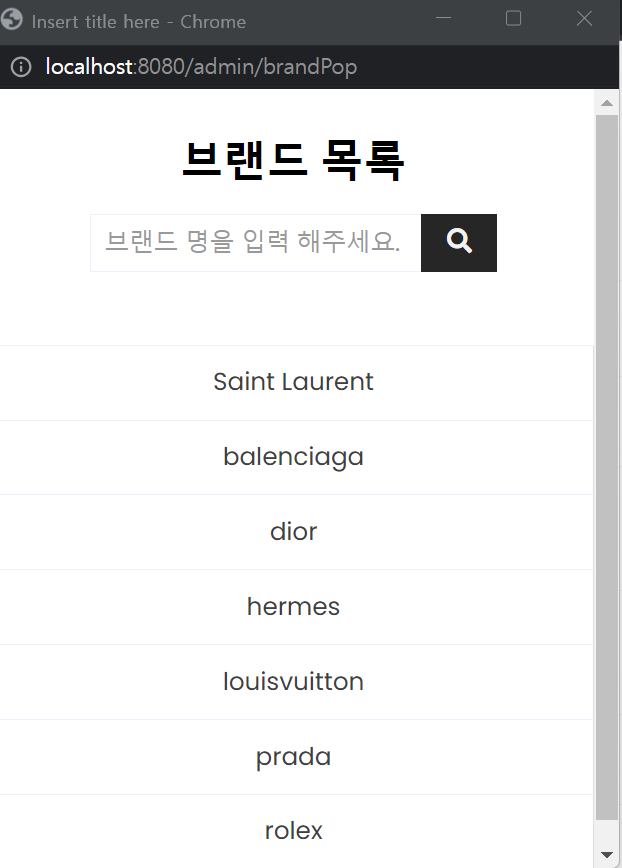
브랜드 목록을 불러와 상품 브랜드를 선택할 수 있는 메서드를 만들어 준다.
	public List<BrandVO> getBrandList(Criteria cri); // 등록된 브랜드 전체 가져오기

     public int brandGetTotal(Criteria cri);// 등록된 브랜드의 수
AdminMapper.xml 에 추가
	<!-- 등록된 브랜드 목록 가져오기 + 검색 -->
	<select id="getBrandList" resultType="com.db.model.BrandVO">
	<![CDATA[
			select * from (
				select /*+INDEX_DESC(SYS_C008746)*/
					rownum as rn, bname
				from brand
				where
				]]>
		<if test="keyword !=null">
			bname like '%'||#{keyword}||'%' and
		</if>
		<![CDATA[
			rownum <= #{pageNum}*#{amount}
			)
			where rn > (#{pageNum}-1)*#{amount}
			]]>
	</select>

	<!-- 등록된 브랜드 갯수 가져오기 -->
	<select id="brandGetTotal" resultType="int">
		select count(*) from brand
		<if test="keyword!=null">
			where bname like '%' || #{keyword} || '%'
		</if>
	</select>
AdminService.java 에 추가
	public List<BrandVO> getBrandList(Criteria cri); // 등록된 브랜드 전체 가져오기

	public int brandGetTotal(Criteria cri);// 등록된 브랜드의 수
AdminServiceImpl.java 에 추가
	@Override
	public List<BrandVO> getBrandList(Criteria cri) {
		return mapper.getBrandList(cri);
	}

	@Override
	public int brandGetTotal(Criteria cri) {
		return mapper.brandGetTotal(cri);
	}
AdminController.java 에 추가
	// 상품등록 시 브랜드 검색창
	@GetMapping("brandPop")
	public void brandPopGET(Criteria cri, Model model) throws Exception {
		logger.info("adminController, brandPop 진입 ... ");

		/* 브랜드 목록 출력 */
		List brandList = adminService.getBrandList(cri);

		if (!brandList.isEmpty()) {
			model.addAttribute("brandList", brandList); // 브랜드 존재 경우
		} else {
			model.addAttribute("listCheck", "empty"); // 브랜드 존재하지 않을 경우
		}

		/* 페이지 이동 인터페이스 데이터 */
		int total = adminService.brandGetTotal(cri);
		PageMakerDTO pageMaker = new PageMakerDTO(cri, total);
		model.addAttribute("pageMaker", pageMaker);

	}
brandPop.jsp 추가
<%@ page language="java" contentType="text/html; charset=UTF-8" pageEncoding="UTF-8"%>
<%@taglib prefix="c" uri="http://java.sun.com/jsp/jstl/core"%>
<%@taglib prefix="fmt" uri="http://java.sun.com/jsp/jstl/fmt"%>
<!DOCTYPE html>
<html>
<head>
<meta charset="UTF-8">
<title>Insert title here</title>
<script src="https://code.jquery.com/jquery-3.4.1.js" integrity="sha256-WpOohJOqMqqyKL9FccASB9O0KwACQJpFTUBLTYOVvVU=" crossorigin="anonymous"></script>
<meta content="width=device-width, initial-scale=1.0" name="viewport">
<!-- Google Web Fonts -->
<link rel="preconnect" href="https://fonts.gstatic.com">
<link href="https://fonts.googleapis.com/css2?family=Poppins:wght@100;200;300;400;500;600;700;800;900&display=swap" rel="stylesheet">
<!-- Font Awesome -->
<link href="https://cdnjs.cloudflare.com/ajax/libs/font-awesome/5.10.0/css/all.min.css" rel="stylesheet">
<!-- Libraries Stylesheet -->
<link href="../resources/css/owl.carousel.min.css" rel="stylesheet">
<!-- Customized Bootstrap Stylesheet -->
<link href="../resources/css/style.css" rel="stylesheet">
<style>
/* 페이지 버튼 인터페이스 */
.pageMaker_wrap {
	text-align: center;
	margin-top: 30px;
	margin-bottom: 40px;
}

.pageMaker_wrap a {
	color: black;
}

.pageMaker {
	list-style: none;
	display: inline-block;
}

.pageMaker_btn {
	float: left;
	width: 40px;
	height: 40px;
	line-height: 40px;
	margin-left: 20px;
}

.next, .prev {
	border: 1px solid #ccc;
	padding: 0 10px;
}

.next a, .prev a {
	color: #ccc;
}

.active { /* 현재 페이지 버튼 */
	border: 2px solid black;
	font-weight: 400;
}

.table_empty {
	text-align: center;
	font-weight: 400;
}
</style>
</head>
<body>
	<div>
		<!-- Page Header Start -->
		<div class="container bg-secondary mb-3" style="max-width: 800px;">
			<div class="d-flex flex-column align-items-center justify-content-center" style="min-height: 150px">
				<h1 class="font-weight-semi-bold text-uppercase mb-3">브랜드 목록</h1>
				<!-- 검색 영역 -->
				<div class="search_wrap">
					<form id="searchForm" action="/admin/brandPop" method="get">
						<div class="input-group" style="max-width: 400px;">
							<input type="text" placeholder="브랜드 명을 입력 해주세요." class="form-control" name="keyword" style="width: 10%" value='<c:out value="${pageMaker.cri.keyword}"></c:out>'> <input type="hidden" name="pageNum" value='<c:out value="${pageMaker.cri.pageNum }"></c:out>'> <input type="hidden" name="amount" value='${pageMaker.cri.amount}'>
							<div class="input-group-append">
								<button class="btn btn-primary px-3">
									<i class="fa fa-search"></i>
								</button>
							</div>
						</div>
					</form>
				</div>
			</div>
		</div>
	</div>
	<!-- 게시물 O -->
	<c:if test="${listCheck != 'empty'}">
		<div class="table_exist">
			<table class="table" style="text-align: center; border: 1px solid #dddddd;">
				<c:forEach items="${brandList}" var="brandList">
					<tr>
						<td><a class="move" href='<c:out value="${brandList.bname}"/>' data-bname='<c:out value="${brandList.bname}"/>'>
								<c:out value="${brandList.bname}" />
							</a></td>
					</tr>
				</c:forEach>
			</table>
		</div>
	</c:if>
	<!-- 게시물 x -->
	<c:if test="${listCheck == 'empty'}">
		<div class="table_empty">등록된 브랜드가 없습니다.</div>
	</c:if>
	<form id="moveForm" action="/admin/brandPop" method="get">
		<input type="hidden" name="pageNum" value="${pageMaker.cri.pageNum}"> <input type="hidden" name="amount" value="${pageMaker.cri.amount}"> <input type="hidden" name="keyword" value="${pageMaker.cri.keyword}">
	</form>
	<script>
		let searchForm = $('#searchForm');
		let moveForm = $('#moveForm');

		/* 브랜드 검색 버튼 동작 */
		$("#searchForm button").on("click", function(e) {

			e.preventDefault();

			/* 검색 키워드 유효성 검사 */
			if (!searchForm.find("input[name='keyword']").val()) {
				alert("키워드를 입력하십시오");
				return false;
			}

			searchForm.find("input[name='pageNum']").val("1");

			searchForm.submit();

		});

		/* 브랜드 선택 및 팝업창 닫기 */
		$(".move").on("click", function(e) {

			e.preventDefault();
			let brandHref = $(this).attr("href");
			let brandName = $(this).data("bname");

			// 			console.log("brandHref:", brandHref);
			// 			console.log("brandName:", brandName);
			// 			console.log("bName_select:", $(opener.document).find("#bName_select").length); // 디버깅을 위한 출력
			// 			console.log("bName_input:", $(opener.document).find("#bName_input").length); // 디버깅을 위한 출력

			$(opener.document).find("#bName_select").val(brandHref);
			$(opener.document).find("#bName_input").val(brandName);

			window.close();

		});
	</script>
</body>
</html>
AdminMapper.java 에 추가
상품 등록 쿼리를 실행할 메서드를 만들어 준다.
public void productEnroll(ProductVO product); // 상품 추가
AdminMapper.xml 에 추가
	<!-- 상품등록 -->
	<insert id="productEnroll">
		<selectKey keyProperty="num" resultType="int" order="BEFORE">
			select
			product_seq.nextval + 256 from dual
		</selectKey>
		insert into product(num, pGender, bname, pname, kind,
		imgurl, psize,
		price, discountrate, balance, purchasednum, explain)
		values(#{num},
		#{pGender}, #{bname}, #{pname}, #{kind}, #{imgUrl, jdbcType=VARCHAR},
		#{psize}, #{price},
		#{discountrate}, #{balance}, #{purchasedNum},
		#{explain})
	</insert>
AdminService.java 에 추가
public void productEnroll(ProductVO product); // 상품 추가
AdminServiceImpl.java 에 추가
	@Override
	public void productEnroll(ProductVO product) {
		mapper.productEnroll(product);

	}
AdminController.java 에 추가
	// 상품 등록
	@PostMapping("adminProductWriteForm")
	public String adminProductWriteFormPOST(ProductVO product, HttpSession session, RedirectAttributes rttr) {
		logger.info("adminController, adminProductWriteForm POST 진입 ... ");

		// 세션에서 imgUrl 값 가져오기
		List<ProductVO> imgUrlList = (List<ProductVO>) session.getAttribute("imgUrlList");

		// imgUrl 값이 null이 아니고 리스트에 값들이 있는 경우 설정
		if (imgUrlList != null && !imgUrlList.isEmpty()) {
			// 첫 번째 이미지 url을 가져옵니다.
			String imgUrl = imgUrlList.get(0).getImgUrl();
			product.setImgUrl(imgUrl);
		}

		// imgUrl 값 사용 후 세션에서 제거 (선택사항)
		session.removeAttribute("imgUrlList");

		adminService.productEnroll(product); // 데이터베이스에 저장
		rttr.addFlashAttribute("enroll_result", product.getPname());
		return "redirect:/admin/adminProductList";
	}
3. 상품 수정 기능
AdminMapper.java 에 추가
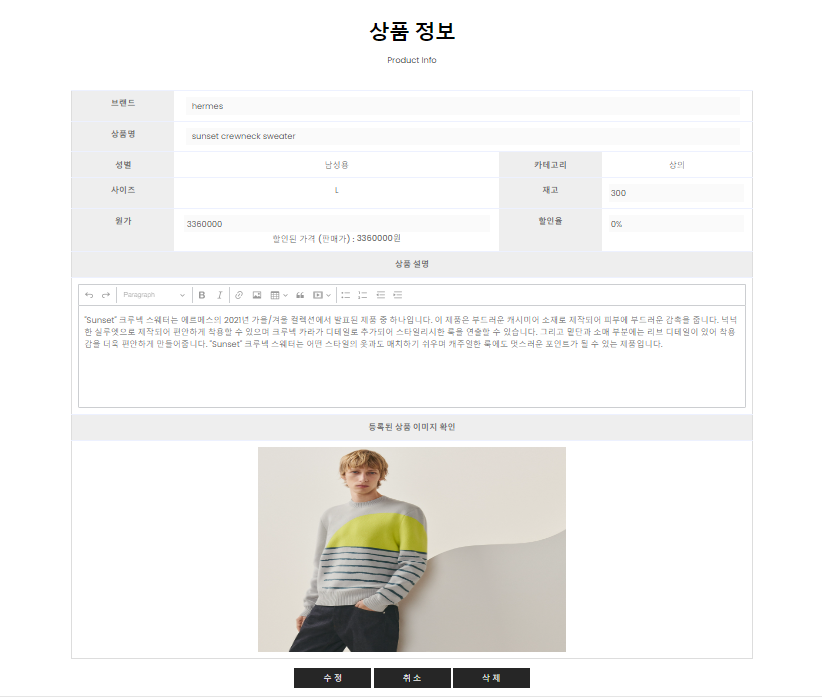
상품의 디테일을 보여주는 페이지를 먼저 만들어 준다.
public ProductVO productGetDetail(int num); // 상품 정보 읽기
AdminMapper.xml 에 추가
	<!-- 상품정보 -->
	<select id="productGetDetail"
		resultType="com.db.model.ProductVO">
		select * from product where num=#{num}
	</select>
AdminService.java 에 추가
public ProductVO productGetDetail(int num); // 상품 정보 읽기
AdminServiceImpl.java 에 추가
	@Override
	public ProductVO productGetDetail(int num) {
		System.out.println("(service) productGetDetail ..... " + num);
		return mapper.productGetDetail(num);
	}
adminProductDetail.jsp 에 추가
<%@ page language="java" contentType="text/html; charset=UTF-8" pageEncoding="UTF-8"%>
<%@taglib prefix="c" uri="http://java.sun.com/jsp/jstl/core"%>
<%@taglib prefix="fmt" uri="http://java.sun.com/jsp/jstl/fmt"%>
<!DOCTYPE html>
<html>
<head>
<meta charset="UTF-8">
<title>Insert title here</title>
<meta content="width=device-width, initial-scale=1.0" name="viewport">
<!-- Google Web Fonts -->
<link rel="preconnect" href="https://fonts.gstatic.com">
<link href="https://fonts.googleapis.com/css2?family=Poppins:wght@100;200;300;400;500;600;700;800;900&display=swap" rel="stylesheet">
<!-- Font Awesome -->
<link href="https://cdnjs.cloudflare.com/ajax/libs/font-awesome/5.10.0/css/all.min.css" rel="stylesheet">
<!-- Libraries Stylesheet -->
<link href="../resources/css/owl.carousel.min.css" rel="stylesheet">
<!-- Customized Bootstrap Stylesheet -->
<link href="../resources/css/style.css" rel="stylesheet">
<script src="https://code.jquery.com/jquery-3.4.1.js" integrity="sha256-WpOohJOqMqqyKL9FccASB9O0KwACQJpFTUBLTYOVvVU=" crossorigin="anonymous"></script>
<script src="https://cdn.ckeditor.com/ckeditor5/38.0.1/classic/ckeditor.js"></script>
<style>
.ck-content {
	height: 200px;
}

input {
	width: 98%;
	padding: 5px 1%;
	border: 0;
	text-aling: center;
}

select {
	width: 98%;
	padding: 5px 1%;
	border: 0;
}

tr th td {
	vertical-align: middle;
	border-collapse: collapse;
}

.step_val { /* 할인 가격 문구 */
	padding-top: 5px;
	font-weight: 500;
}

.ck_warn { /* 입력란 공란 경고 태그 */
	display: none;
	padding-top: 10px;
	text-align: center;
	color: #e05757;
	font-weight: 300;
}
</style>
<jsp:include page="../header.jsp"></jsp:include>
</head>
<body>
	<hr>
	<div>
		<!-- Page Header Start -->
		<div class="container bg-secondary mb-3" style="max-width: 800px;">
			<div class="d-flex flex-column align-items-center justify-content-center" style="min-height: 150px">
				<h1 class="font-weight-semi-bold text-uppercase mb-3">상품 정보</h1>
				<p class="m-0">
					<a href="adminProductList">Product Info</a>
				</p>
			</div>
		</div>
	</div>
	<!-- Page Header End -->
</head>
<!-- Shop Detail Start -->
<div align="center">
	<table class="table" style="text-align: center; border: 1px solid #dddddd; width: 70%;">
		<tr>
			<th style="background-color: #eeeeee; text-align: center; width: 200px;">브랜드</th>
			<td colspan="3"><input id="bname" value="<c:out value="${productDetail.bname }"/>" disabled="disabled"></td>
		</tr>
		<tr>
			<th style="background-color: #eeeeee; text-align: center;">상품명</th>
			<td colspan="3"><input id="pname" value="<c:out value="${productDetail.pname }"/>" disabled="disabled"></td>
		</tr>
		<tr>
			<th style="background-color: #eeeeee; text-align: center;">성별</th>
			<td><c:if test="${productDetail.pGender==1 }">남성용</c:if> <c:if test="${productDetail.pGender==2 }">여성용</c:if> <c:if test="${productDetail.pGender==3 }">공용</c:if></td>
			<th style="background-color: #eeeeee; text-align: center;">카테고리</th>
			<td><c:if test="${productDetail.kind==1 }">상의</c:if> <c:if test="${productDetail.kind==2 }">하의</c:if> <c:if test="${productDetail.kind==3 }">잡화</c:if></td>
		</tr>
		<tr>
			<th style="background-color: #eeeeee; text-align: center;">사이즈</th>
			<td><c:choose>
					<c:when test="${productDetail.psize =='Free'}">
						<c:out value="${productDetail.psize }"></c:out>
					</c:when>
					<c:when test="${productDetail.psize =='XS'}">
						<c:out value="${productDetail.psize }"></c:out>
					</c:when>
					<c:when test="${productDetail.psize =='S'}">
						<c:out value="${productDetail.psize }"></c:out>
					</c:when>
					<c:when test="${productDetail.psize =='M'}">
						<c:out value="${productDetail.psize }"></c:out>
					</c:when>
					<c:when test="${productDetail.psize =='L'}">
						<c:out value="${productDetail.psize }"></c:out>
					</c:when>
					<c:when test="${productDetail.psize =='XL'}">
						<c:out value="${productDetail.psize }"></c:out>
					</c:when>
					<c:when test="${productDetail.psize =='XXL'}">
						<c:out value="${productDetail.psize }"></c:out>
					</c:when>
				</c:choose></td>
			<th style="background-color: #eeeeee; text-align: center; width: 200px">재고</th>
			<td><input name="balance" value="${productDetail.balance }" disabled="disabled"></td>
		</tr>
		<tr>
			<th style="background-color: #eeeeee; text-align: center;">원가</th>
			<td><input name="price" value="${productDetail.price }" disabled="disabled"> <span class="step_val">
					할인된 가격 (판매가) :
					<span class="span_discount"></span>
				</span></td>
			<th style="background-color: #eeeeee; text-align: center; width: 200px">할인율</th>
			<td><input name="discountrate_input" value="<fmt:formatNumber value="${productDetail.discountrate/100}" type="percent" />" disabled="disabled"> <input type="hidden" name="discountrate" value="${productDetail.discountrate}" /></td>
		</tr>
		<tr>
			<th colspan="4" style="background-color: #eeeeee; text-align: center;">상품 설명</th>
		</tr>
		<tr>
			<td colspan="4">
				<div class="explainTextarea">
					<textarea name="explain" id="productExplainEditor"><c:out value="${productDetail.explain }"></c:out></textarea>
				</div>
			</td>
		</tr>
		<tr>
			<th colspan="4" style="background-color: #eeeeee; text-align: center;">등록된 상품 이미지 확인</th>
		</tr>
		<tr>
			<td colspan="4"><c:choose>
					<c:when test="${empty productDetail.imgUrl }">
						등록된 이미지가 없습니다.
					</c:when>
					<c:otherwise>
						<img style="width: 600px; height: 400px" src="/admin/display?fileName=${productDetail.imgUrl}" />
					</c:otherwise>
				</c:choose></td>
		</tr>
	</table>
	<button class="btn btn-primary px-3" style="width: 150px" id="modifyBtn">수 정</button>
	<button class="btn btn-primary px-3" style="width: 150px" id="cancelBtn">취 소</button>
	<button class="btn btn-primary px-3" style="width: 150px" id="deleteBtn">삭 제</button>
	<form id="moveForm" action="/admin/adminProductList" method="get">
		<input type="hidden" name="pageNum" value="${pageMaker.cri.pageNum}"> <input type="hidden" name="amount" value="${pageMaker.cri.amount}"> <input type="hidden" name="keyword" value="${pageMaker.cri.keyword}">
	</form>
</div>
<hr>
<script>
/*취소 버튼 */
$("#cancelBtn").click(function(){
	location.href="/admin/adminProductList"
});

/* 수정 페이지 이동 */
$("#modifyBtn").on("click", function(e){
	e.preventDefault();
	let addInput = '<input type="hidden" name="num" value="${productDetail.num}">';
	$("#moveForm").append(addInput);
	$("#moveForm").attr("action", "/admin/adminProductModify");
	$("#moveForm").submit();
});

/*삭제 버튼*/
$("#deleteBtn").on("click", function(e){
	e.preventDefault();
	if(confirm("정말 삭제하시겠습니까? 삭제 후 내용 복구는 할 수 없습니다.")) {
		let moveForm = $("#moveForm");
		moveForm.find("input").remove();
		moveForm.append('<input type="hidden" name="num" value="${productDetail.num}">');
		moveForm.attr("action", "/admin/adminProductDelete");
		moveForm.attr("method", "post");
		moveForm.submit();
	}
});


$(document).ready(function(){

		  let discountRate = $("input[name='discountrate']").val();  // 할인율 값 가져오기
		  let goodsPrice = $("input[name='price']").val();           // 원가
		  let discountPrice = goodsPrice * (1 - discountRate / 100); // 할인가격

		  $(".span_discount").html(discountPrice.toFixed(0) + "원");

	/*위지윅*/
	/*상품설명 등록 */
	ClassicEditor
		.create(document.querySelector('#productExplainEditor'))
		.then(editor => {
					console.log(editor);
					editor.enableReadOnlyMode( 'my-feature-id' );
				})
		.catch(error=>{
			console.error(error);
	});

});

</script>
</body>
<jsp:include page="../footer.jsp"></jsp:include>
</html>
AdminController.java 에 추가
	// 상품 정보
	@GetMapping("adminProductDetail")
	public void adiminProductDetailGET(int num, Criteria cri, Model model) {
		logger.info("adminController, adminProductDetail 진입 ... " + num);

		/* 목록 페이지 조건 정보 */
		model.addAttribute("cri", cri);

		/* 조회 페이지 정보 */
		model.addAttribute("productDetail", adminService.productGetDetail(num));
	}
AdminController.java 에 추가
	// 상품 수정 페이지
	@GetMapping("adminProductModify")
	public void adimProductModifyGET(int num, Model model) {
		logger.info("adminController, adminProductModify 진입 ... " + num);
		/* 조회 페이지 정보 */
		model.addAttribute("productDetail", adminService.productGetDetail(num));
	}
adminProductModify.jsp 추가
<%@ page language="java" contentType="text/html; charset=UTF-8" pageEncoding="UTF-8"%>
<%@taglib prefix="c" uri="http://java.sun.com/jsp/jstl/core"%>
<%@taglib prefix="fmt" uri="http://java.sun.com/jsp/jstl/fmt"%>
<!DOCTYPE html>
<html>
<head>
<meta charset="UTF-8">
<title>Insert title here</title>
<script src="https://cdn.ckeditor.com/ckeditor5/38.0.1/classic/ckeditor.js"></script>
<script src="https://code.jquery.com/jquery-3.4.1.js" integrity="sha256-WpOohJOqMqqyKL9FccASB9O0KwACQJpFTUBLTYOVvVU=" crossorigin="anonymous"></script>
<style>
.ck-content {
	height: 200px;
}

input {
	width: 98%;
	padding: 5px 1%;
	border: 0;
	text-aling: center;
}

select {
	width: 98%;
	padding: 5px 1%;
	border: 0;
}

tr th td {
	vertical-align: middle;
	border-collapse: collapse;
}

.step_val { /* 할인 가격 문구 */
	padding-top: 5px;
	font-weight: 500;
}

.ck_warn { /* 입력란 공란 경고 태그 */
	display: none;
	padding-top: 10px;
	text-align: center;
	color: #e05757;
	font-weight: 300;
}
</style>
<meta content="width=device-width, initial-scale=1.0" name="viewport">
<!-- Google Web Fonts -->
<link rel="preconnect" href="https://fonts.gstatic.com">
<link href="https://fonts.googleapis.com/css2?family=Poppins:wght@100;200;300;400;500;600;700;800;900&display=swap" rel="stylesheet">
<!-- Font Awesome -->
<link href="https://cdnjs.cloudflare.com/ajax/libs/font-awesome/5.10.0/css/all.min.css" rel="stylesheet">
<!-- Libraries Stylesheet -->
<link href="../resources/css/owl.carousel.min.css" rel="stylesheet">
<!-- Customized Bootstrap Stylesheet -->
<link href="../resources/css/style.css" rel="stylesheet">
</head>
<jsp:include page="../header.jsp"></jsp:include>
<body>
	<hr>
	<div>
		<!-- Page Header Start -->
		<div class="container bg-secondary mb-3" style="max-width: 800px;">
			<div class="d-flex flex-column align-items-center justify-content-center" style="min-height: 150px">
				<h1 class="font-weight-semi-bold text-uppercase mb-3">상품 수정</h1>
				<p class="m-0"></p>
			</div>
		</div>
	</div>
	<!-- Page Header End -->
	<!-- Shop Detail Start -->
	<div align="center">
		<form action="/admin/adminProductModify" method="post" id="modifyForm" enctype="multipart/form-data">
			<input type="hidden" name="num" value="${productDetail.num}">
			<table class="table" style="text-align: center; border: 1px solid #dddddd; width: 70%;">
				<tr>
					<th style="background-color: #eeeeee; text-align: center; width: 200px;">브랜드</th>
					<td colspan="4"><input id="bName_select" value="${productDetail.bname}" style="Width: 75%" readonly="readonly"> <input id="bName_input" name="bname" type="hidden" value="${productDetail.bname}">
						<button id="select_brand" class="btn btn-primary px-3" style="width: 150px">선택</button>
						<div>
							<span class="ck_warn bname_warn">브랜드를 선택해주세요.</span>
						</div></td>
				</tr>
				<tr>
					<th style="background-color: #eeeeee; text-align: center;">상품명</th>
					<td colspan="4"><input id="pnameId" name="pname" value="${productDetail.pname }">
						<div>
							<span class="ck_warn pname_warn">상품명을 입력해주세요.</span>
						</div></td>
				</tr>
				<tr>
					<th style="background-color: #eeeeee; text-align: center;">성별</th>
					<td colspan="4"><label> <input type="radio" name="pGender" value="1" ${productDetail.pGender == "1" ? "checked" : ""}> 남성용
					</label> <label> <input type="radio" name="pGender" value="2" ${productDetail.pGender == "2" ? "checked" : ""}> 여성용
					</label> <label> <input type="radio" name="pGender" value="3" ${productDetail.pGender == "3" ? "checked" : ""}> 공용
					</label>
						<div>
							<span class="ck_warn pGender_warn">상품의 성별을 선택해주세요.</span>
						</div></td>
				</tr>
				<tr>
					<th style="background-color: #eeeeee; text-align: center;">카테고리</th>
					<td colspan="4"><label> <input type="radio" name="kind" value="1" ${productDetail.kind == "1" ? "checked" : ""}> 상의
					</label> <label> <input type="radio" name="kind" value="2" ${productDetail.kind == "2" ? "checked" : ""}> 하의
					</label> <label> <input type="radio" name="kind" value="3" ${productDetail.kind == "3" ? "checked" : ""}> 잡화
					</label>
						<div>
							<span class="ck_warn kind_warn">상품의 카테고리를 선택해주세요.</span>
						</div></td>
				</tr>
				<tr>
					<th style="background-color: #eeeeee; text-align: center;">사이즈</th>
					<td><select name="psize">
							<option value="Free" ${productDetail.psize == "Free" ? "selected" : ""}>Free</option>
							<option value="XS" ${productDetail.psize == "XS" ? "selected" : ""}>XS</option>
							<option value="S" ${productDetail.psize == "S" ? "selected" : ""}>S</option>
							<option value="M" ${productDetail.psize == "M" ? "selected" : ""}>M</option>
							<option value="L" ${productDetail.psize == "L" ? "selected" : ""}>L</option>
							<option value="XL" ${productDetail.psize == "XL" ? "selected" : ""}>XL</option>
							<option value="XXL" ${productDetail.psize == "XXL" ? "selected" : ""}>XXL</option>
					</select>
						<div>
							<span class="ck_warn psize_warn">상품 사이즈를 선택해주세요.</span>
						</div></td>
					<th style="background-color: #eeeeee; text-align: center; width: 200px">재고</th>
					<td><input name="balance" type="number" value="${productDetail.balance }">
						<div>
							<span class="ck_warn balance_warn">상품의 재고를 입력해주세요.</span>
						</div></td>
				</tr>
				<tr>
					<th style="background-color: #eeeeee; text-align: center;">원가</th>
					<td><input name="price" type="number" value="${productDetail.price }">
						<div>
							<span class="step_val">
								할인된 가격 (판매가) :
								<span class="span_discount"></span>
								원
							</span>
							<span class="ck_warn price_warn">상품의 가격을 입력해주세요.</span>
						</div></td>
					<th style="background-color: #eeeeee; text-align: center; width: 200px">할인율</th>
					<td><input id="discount_interface" maxlength="2" value="<fmt:formatNumber value="${productDetail.discountrate/100}" type="percent" />"> <input name="discountrate" type="hidden" value="0"></td>
				</tr>
				<tr>
					<th colspan="4" style="background-color: #eeeeee; text-align: center;">상품 설명</th>
				</tr>
				<tr>
					<td colspan="4">
						<div class="explainTextarea">
							<textarea name="explain" id="productExplainEditor">${productDetail.explain }</textarea>
						</div>
						<div>
							<span class="ck_warn explain_warn">상품의 설명을 입력해주세요.</span>
						</div>
					</td>
				</tr>
				<tr>
					<th colspan="4" style="background-color: #eeeeee; text-align: center;">등록된 상품이미지 확인</th>
				</tr>
				<tr>
					<td colspan="4"><c:choose>
							<c:when test="${empty productDetail.imgUrl}">
								<span>등록된 이미지가 없습니다.</span>
							</c:when>
							<c:otherwise>
								<img style="width: 600px; height: 400px" src="/admin/display?fileName=${productDetail.imgUrl}" />
							</c:otherwise>
						</c:choose></td>
				</tr>
				<tr>
					<th colspan="2" style="background-color: #eeeeee; text-align: center;">상품 이미지 변경</th>
					<td colspan="4"><input type="file" id="fileItem" name="uploadFile" style="height: 30px;"></td>
				</tr>
			</table>
		</form>
		<button class="btn btn-primary px-3" style="width: 150px" id="modifyBtn">수 정</button>
		<button class="btn btn-primary px-3" style="width: 150px" id="cancelBtn">취 소</button>
	</div>
	<hr>
	<script>
	/*위지윅*/
	/*상품설명 등록 */
	ClassicEditor
		.create(document.querySelector('#productExplainEditor'))
		.catch(error=>{
			console.error(error);
	});

	/*취소 버튼 */
	$("#cancelBtn").click(function(){
		location.href="/admin/adminProductList"
	});

	/* 수정 버튼 */
	$("#modifyBtn").on("click", function(e){
		e.preventDefault();

		/*유효성 검사 체크 변수 선언*/
		let bnameCk = false;
		let pnameCk = false;
		let pGenderCk = false;
		let kindCk = false;
		let psizeCk = false;
		let balanceCk = false;
		let priceCk = false;
		let explainCk = false;

		/* 체크 대상 변수 */
		let bname = $("input[id='bName_select']").val();
		let pname = $("input[id='pnameId']").val().trim();
		let pGender = $("input[name='pGender']:checked").val();
		let kind = $("input[name='kind']:checked").val();
		let psize = $("select[name='psize']").val();
		let balance = parseInt($("input[name='balance']").val(), 10);
		let price = parseInt($("input[name='price']").val(), 10);
		let explain = $(".explainTextarea p").html();

		if(bname!== ''){
			$(".bname_warn").css('display','none');
			bnameCk = true;
		} else {
			$(".bname_warn").css('display','block');
			bnameCk = false;
		}

		if(pname!== ''){
			$(".pname_warn").css('display','none');
			pnameCk = true;
		} else {
			$(".pname_warn").css('display','block');
			pnameCk = false;
		}

		if(pGender){
			$(".pGender_warn").css('display','none');
			pGenderCk = true;
		} else {
			$(".pGender_warn").css('display','block');
			pGenderCk = false;
		}

		if(kind){
			$(".kind_warn").css('display','none');
			kindCk = true;
		} else {
			$(".kind_warn").css('display','block');
			kindCk = false;
		}

		if(psize){
			$(".psize_warn").css('display','none');
			psizeCk = true;
		} else {
			$(".psize_warn").css('display','block');
			psizeCk = false;
		}

		if (!isNaN(balance) && balance >= 0) {
			  $(".balance_warn").css('display', 'none');
			  balanceCk = true;
			} else {
			  $(".balance_warn").css('display', 'block');
			  balanceCk = false;
			}

		if (!isNaN(price) && price > 0) {
			  $(".price_warn").css('display', 'none');
			  priceCk = true;
			} else {
			  $(".price_warn").css('display', 'block');
			  priceCk = false;
			}

		if(explain != '<br data-cke-filler="true">'){
			$(".explain_warn").css('display','none');
			explainCk = true;
		} else {
			$(".explain_warn").css('display','block');
			explainCk = false;
		}

		if(bnameCk && pnameCk && pGenderCk && kindCk && psizeCk && priceCk && balanceCk && explainCk){
			alert('통과');
			$("#modifyForm").submit();
		} else {
			return false;
		}
	});

	/*브랜드 선택*/
	$("#select_brand").click(function(e){
		e.preventDefault();

		let popUrl = "/admin/brandPop";
		let popOption = "width = 400px, height=500px, top=300px, left=300px, scrollbars=yes";

		window.open(popUrl,"브랜드 검색",popOption);

	});


	$(document).ready(function() {
		  let userInput = $("#discount_interface");
		  let discountInput = $("input[name='discountrate']");
		  let goodsPriceInput = $("input[name='price']");
		  let spanDiscount = $(".span_discount");

		  let discountRate = parseFloat(userInput.val()); // 사용자가 입력한 할인값 (숫자로 변환)
		  let goodsPrice = parseFloat(goodsPriceInput.val()); // 원가 (숫자로 변환)

		  // 할인율과 원가에 입력된 값으로 할인가격 계산
		  let discountPrice = goodsPrice * (1 - discountRate / 100);

		  discountInput.val(discountRate); // 서버에 전송할 할인값
		  spanDiscount.text(discountPrice); // 할인가격을 출력합니다.

		  // 할인율 입력란 변경 시
		  userInput.on("propertychange change keyup paste input", function() {
		    discountRate = parseFloat(userInput.val());
		    discountPrice = goodsPrice * (1 - discountRate / 100);

		    discountInput.val(discountRate);
		    spanDiscount.text(discountPrice);
		  });

		  // 원가 입력란 변경 시
		  goodsPriceInput.on("change", function() {
		    goodsPrice = parseFloat(goodsPriceInput.val());
		    discountPrice = goodsPrice * (1 - discountRate / 100);

		    spanDiscount.text(discountPrice);
		  });
		});


	/*이미지 업로드*/
	$("input[type='file']").on("change", function(e){
		alert("동작 확인");

		/* /*이미지 존재 시 삭제
		if($(".imgDeleteBtn").length > 0){
			deleteFile();
		} */

		let formData = new FormData();
		let fileInput=$('input[name="uploadFile"]');
		let fileList=fileInput[0].files;
		let fileObj=fileList[0];

		console.log("fileList : "+ fileList);
		console.log("fileObj : " + fileObj);
		console.log("fileName : "+ fileObj.name);
		console.log("fileSize : " + fileObj.size);
		console.log("fileType(MimeType) : " + fileObj.type);

		if(!fileCheck(fileObj.name, fileObj.size)){
			return false;
		}

		alert("통과");
		formData.append("uploadFile", fileObj);

		$.ajax({
			url: '/admin/uploadAjaxAction', //서버로 요청을 보낼 url
			processData : false, // 서버로 전송할 데이터를 queryString 형태로 변환할지 여부
			contentType : false, // 서버로 전송되는 데이터의 content-type
			data : formData, // 서버로 전송할 데이터
			type : 'POST', // 서버로 요청 타입 (get, post)
			dataType : 'json', // 서버로부터 반환받을 데이터 타입
			success : function(result){
				console.log(result);
				showUploadImage(result);
			},
			error: function(result){
				console.log(result);
				alert("업로드 실패");
			}
		});
	});


	/*var, mehtod related with attachFile*/
	let regex  = new RegExp("(.*?)\.(jpg|png)$");
	let maxSize = 1048576; //1MB

	function fileCheck(fileName, fileSize){
		if(fileSize >= maxSize){
			alert("파일 사이즈 초과");
			return false;
		}

		if(!regex.test(fileName)){
			alert("해당 종류의 파일은 업로드 할 수 없습니다.");
			return false;
		}
		return true;
	}

	function showUploadImage(uploadResultArr) {
		console.log("showUploadImage called");
		console.log(uploadResultArr);

		  let uploadResult = $("#uploadResult");

		  let str = "";

		  for (let i = 0; i < uploadResultArr.length; i++) {
		    let obj = uploadResultArr[i];

		    if (!obj || !obj.imgUrl) {
		      console.log("Invalid object or missing imgUrl property");
		      continue;
		    }

		    let fileCallPath = "/admin/display?fileName=" + obj.imgUrl;

			console.log("obj.imgUrl : " + obj.imgUrl);
		    console.log("fileCallPath: " + fileCallPath);

		    str += "<div id='result_card'>";
		    str += "<img src='"+fileCallPath+"'>";
		    str += "<div class='imgDeleteBtn'>x</div>";
		    str += "</div>";

		    console.log("Appending the following HTML string: " + str);
		  }
			uploadResult.html(str);
		}


	</script>
</body>
<jsp:include page="../footer.jsp"></jsp:include>
</html>
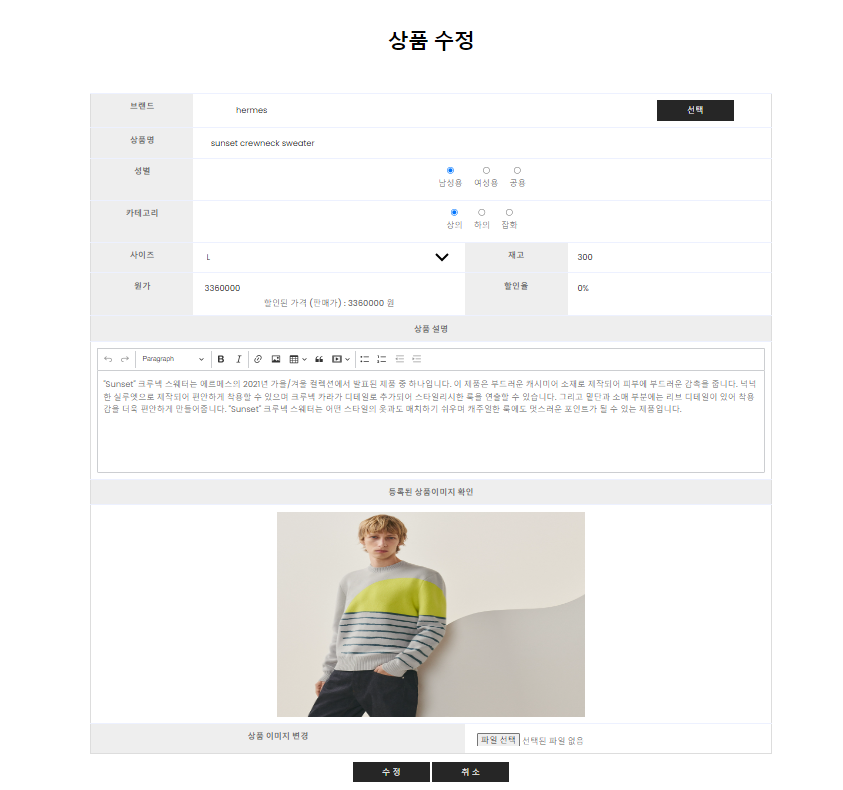
AdminMapper.java 에 추가
상품 수정 쿼리를 실행할 메서드를 만들어 준다.
public int productModify(ProductVO product); // 선택 상품 수정
AdminMapper.xml 에 추가
	<!-- 상품 수정 -->
	<update id="productModify">
		update product set
		bname = #{bname},
		pname = #{pname},
		pGender = #{pGender},
		kind = #{kind},
		psize = #{psize},
		price = #{price},
		discountrate =
		#{discountrate},
		balance = #{balance},
		explain =
		#{explain},
		imgUrl=#{imgUrl, jdbcType=VARCHAR}
		where num=#{num}
	</update>
AdminService.java 에 추가
public int productModify(ProductVO product); // 선택 상품 수정
AdminServiceImpl.java 에 추가
	@Override
	public int productModify(ProductVO product) {
		System.out.println("(service) productModify ..... ");
		return mapper.productModify(product);
	}
AdminController.java 에 추가
	// 상품 정보 수정
	@Transactional
	@PostMapping("/adminProductModify")
	public String adminProductModifyPOST(ProductVO product, HttpSession session, RedirectAttributes rttr)
			throws Exception {
		logger.info("adminProductModifyPOST.........." + product);

		// 세션에서 imgUrl 값 가져오기
		List<ProductVO> imgUrlList = (List<ProductVO>) session.getAttribute("imgUrlList");

		// imgUrl 값이 존재하면 새로운 파일 업로드 후 가져온 이미지 경로를 저장하고, imgUrl 값이 없다면 기존 경로를 그대로 저장하기
		if (imgUrlList != null && !imgUrlList.isEmpty()) {
			String imgUrl = imgUrlList.get(0).getImgUrl();
			product.setImgUrl(imgUrl);
		} else {
			ProductVO oldProduct = adminService.productGetDetail(product.getNum());
			product.setImgUrl(oldProduct.getImgUrl());
		}

		// imgUrl 값 사용 후 세션에서 제거 (선택사항)
		session.removeAttribute("imgUrlList");

		int result = adminService.productModify(product);
		logger.info("result : " + result);
		rttr.addFlashAttribute("modify_result", result);

		return "redirect:/admin/adminProductList";
	}
4. 상품 삭제 기능
AdminMapper.java 에 추가
public int productDelete(int num); // 선택 상품 삭제
AdminMapper.xml 에 추가
	<!-- 상품 삭제 -->
	<delete id="productDelete">
		delete from product where num=#{num}
	</delete>
AdminService.java 에 추가
public int productDelete(int num); // 선택 상품 삭제
AdminServiceImpl.java 에 추가
	@Override
	public int productDelete(int num) {
		System.out.println("(service) productDelete ..... " + num);
		return mapper.productDelete(num);
	}
AdminController.java 에 추가
	// 상품 삭제
	@PostMapping("/adminProductDelete")
	public String productDeletePOST(int num, RedirectAttributes rttr) {
		logger.info("productDeletePOST..........");
		int result = adminService.productDelete(num);
		rttr.addFlashAttribute("delete_result", result);
		return "redirect:/admin/adminProductList";

	}