사용한 플랫폼 : Spring, Oracle
1. 옥션 등록 기능
AuctionVO.java 추가
package com.db.model;

import java.sql.Timestamp;

import lombok.Data;

@Data
public class AuctionVO {
	private String userid, bname, pname, psize, imgUrl;
	private int price, endPrice, startPrice, onOff, num;
	private Timestamp endTime;
}
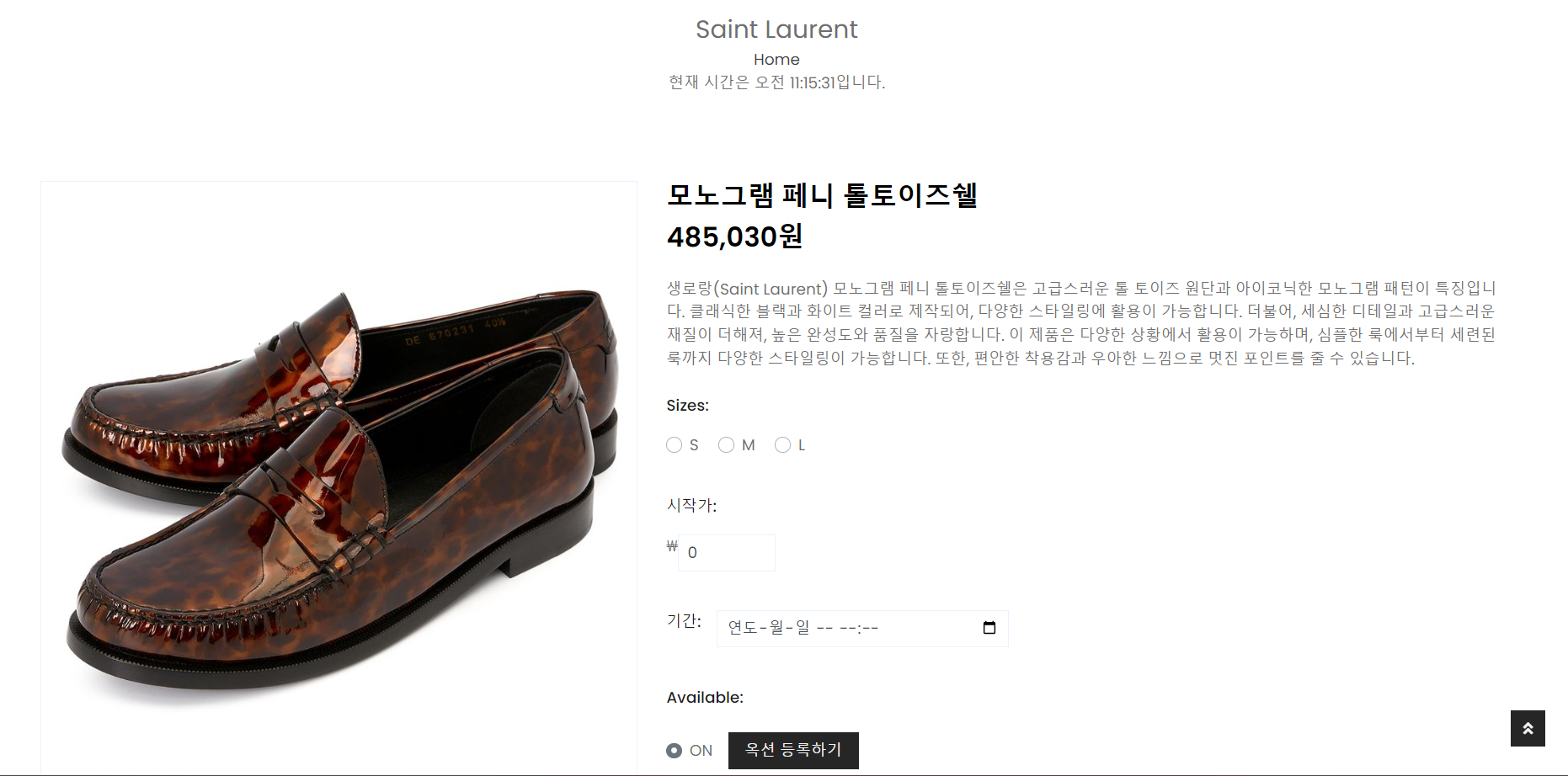
옥션 등록 방식은 브랜드 리스트 -> 상품 리스트 -> 옥션 등록 상품 선택 - > 사이즈와 시작가, 기간을 설정 후 등록 하는 방식이다.
옥션 등록 상품 전 단계 까지의 페이지 이동은 기존에 사용했던 메서드를 사용한다.
AdminController.java 에 추가
	@Autowired
	ProductService productService;

    // 옥션 시작
	// 브랜드 리스트 페이지
	@GetMapping("adminAuctionBrandList")
	public void AdminAuctionBrandListGET(Model model) throws Exception {
		System.out.println("adminAuctionBrandList 접속");
		ArrayList<BrandVO> list = productService.brandList();
		System.out.println("list: " + list);
		model.addAttribute("list", list);
	}

	// 브랜드 상품 리스트 페이지
	@GetMapping("adminAuctionBrandProductList")
	public void AdminAuctionBrnadProductListGET(Model model, String bname) throws Exception {
		System.out.println("adminAuctionBrandProductList 접속");
		ArrayList<ProductVO> list = productService.brandProductList(bname);
		model.addAttribute("list", list);
	}
adminAuctionBrandList.jsp 추가
<%@page import="java.io.PrintWriter"%>
<%@ page language="java" contentType="text/html; charset=UTF-8" pageEncoding="UTF-8"%>
<%@ taglib prefix="c" uri="http://java.sun.com/jsp/jstl/core"%>
<%@ taglib prefix="fmt" uri="http://java.sun.com/jsp/jstl/fmt"%>
<!DOCTYPE html>
<html>
<head>
<meta charset="UTF-8">
<jsp:include page="../header.jsp"></jsp:include>
</head>
<body>
	<hr>
	<!-- Page Header Start -->
	<div class="container bg-secondary mb-3" style="max-width: 800px;">
		<div class="d-flex flex-column align-items-center justify-content-center" style="min-height: 200px">
			<h1 class="font-weight-semi-bold text-uppercase mb-3">옥션 등록</h1>
			<div class="d-inline-flex">
				<p class="m-0">
					<a href="/">Home</a>
				</p>
			</div>
		</div>
	</div>
	<!-- Categories Start -->
	<div class="container-fluid pt-5">
		<div class="row px-xl-5 pb-3">
			<c:forEach items="${list }" var="list">
				<div class="col-lg-4 col-md-6 pb-1">
					<div class="cat-item text-center" style="padding: 30px;">
						<p class="text-right"></p>
						<a href="/admin/adminAuctionBrandProductList?bname=${list.bname }" class="cat-img position-relative overflow-hidden mb-3">
							<img class="img-fluid" src="../resources/img/${list.imgurl}" alt="">
						</a>
						<h5 class="font-weight-semi-bold m-0"></h5>
					</div>
				</div>
			</c:forEach>
		</div>
	</div>
	<!-- Categories End -->
	<hr>
</body>
<jsp:include page="../footer.jsp"></jsp:include>
</html>
adminAuctionBrandProductList.jsp 추가
<%@ page language="java" contentType="text/html; charset=UTF-8" pageEncoding="UTF-8"%>
<%@ taglib prefix="c" uri="http://java.sun.com/jsp/jstl/core"%>
<%@ taglib prefix="fmt" uri="http://java.sun.com/jsp/jstl/fmt"%>
<!DOCTYPE html>
<html>
<head>
<meta charset="UTF-8">
<jsp:include page="../header.jsp"></jsp:include>
</head>
<body>
	<hr>
	<!-- Page Header Start -->
	<div class="container bg-secondary mb-3" style="max-width: 800px;">
		<div class="d-flex flex-column align-items-center justify-content-center" style="min-height: 200px">
			<h1 class="font-weight-semi-bold text-uppercase mb-3">옥션 등록</h1>
			<p class="m-0">${bname }</p>
			<div class="d-inline-flex">
				<p class="m-0">
					<a href="/">Home</a>
				</p>
			</div>
		</div>
	</div>
	<!-- Page Header End -->
	<!-- Shop Start -->
	<div id="my-container" class="container-fluid pt-5">
		<!-- Shop Product Start -->
		<div class="col-lg-9 col-md-12">
			<div class="row pb-3">
				<c:forEach var="CateGoriesList" items="${list }">
					<div class="col-lg-4 col-md-6 col-sm-12 pb-1">
						<div class="card product-item border-0 mb-4">
							<div class="card-header product-img position-relative overflow-hidden bg-transparent border p-0">
								<a href="/admin/auctionBrandProductDetail?pname=${CateGoriesList.pname}">
									<img class="img-fluid w-100" style="height: 280px" src="../resources/img/${CateGoriesList.imgUrl}" alt="">
								</a>
							</div>
							<div class="card-body border-left border-right text-center p-0 pt-4 pb-3">
								<h6 class="text-truncate mb-3">${CateGoriesList.pname}</h6>
								<div class="d-flex justify-content-center">
									<%-- 통화 단위 지정 --%>
									<fmt:formatNumber value="${Integer.parseInt(CateGoriesList.price)}" pattern="###,###원" />
								</div>
							</div>
						</div>
					</div>
				</c:forEach>
			</div>
		</div>
		<!-- Shop Product End -->
	</div>
	<!-- Shop End -->
	<hr>
</body>
<jsp:include page="../footer.jsp"></jsp:include>
</html>
ProductMapper.java 에 추가
상품 이름으로 상세정보를 불러오는 메서드를 만들어 준다.
	// 제품 이름으로 제품 불러오기
	public ProductVO productDetailByPname(String name);
ProductMapper.xml 에 추가
	<!-- 제품 이름으로 제품상세 불러오기 -->
	<select id="productDetailByPname"
		resultType="com.db.model.ProductVO">
		select * from product where pname = #{pname} and rownum = 1
	</select>
ProductService.java 에 추가
	// 상품 상세(제품 이름으로 검색)
	public ProductVO productDetailByPname(String pname) throws Exception;
ProductServiceImpl.java 에 추가
	@Override
	public ProductVO productDetailByPname(String pname) throws Exception {
		return productmapper.productDetailByPname(pname);
	}
AdminController.java 에 추가
	// 브랜드 상품 디테일 페이지
	@GetMapping("auctionBrandProductDetail")
	public void AuctionBrandProductDetailGET(String pname, String bname, Model model) throws Exception {
		System.out.println("auctionBrandProductDetail 접속");
		ProductVO pVo = productService.productDetailByPname(pname);
		List<ProductVO> sList = productService.productSizeList(pname);
		model.addAttribute("product", pVo);
		model.addAttribute("pSize", sList);
	}
auctionBrandProductDetail.jsp 추가
<%@ page language="java" contentType="text/html; charset=UTF-8" pageEncoding="UTF-8"%>
<%@ taglib prefix="c" uri="http://java.sun.com/jsp/jstl/core"%>
<%@ taglib prefix="fmt" uri="http://java.sun.com/jsp/jstl/fmt"%>
<!DOCTYPE html>
<html>
<head>
<meta charset="UTF-8">
<script>
// 5초마다 메시지를 출력하는 타이머 함수
function startTimer() {
setInterval(function() {
var message = "현재 시간은 " + new Date().toLocaleTimeString() + "입니다.";
document.getElementById("timer").innerHTML = message;
}, 1000);
}
</script>
<jsp:include page="../header.jsp"></jsp:include>
</head>
<hr>
<body onload="startTimer()">
<!-- Page Header Start -->
<div class="container bg-secondary mb-3" style="max-width: 800px;">
<div class="d-flex flex-column align-items-center justify-content-center" style="min-height: 200px">
<h1 class="font-weight-semi-bold text-uppercase mb-3">옥션 등록</h1>
<p class="m-0" style="font-size: 1.6em;">${product.bname}</p>
<div class="d-inline-flex">
<p class="m-0">
<a href="/">Home</a>
</p>
</div>
<div id="timer"></div>
</div>
</div>
<!-- Page Header End -->
<!-- Shop Detail Start -->
<div class="container-fluid py-5">
<div class="row px-xl-5">
<div class="col-lg-5 pb-5">
<div id="product-carousel" class="carousel slide" data-ride="carousel">
<div class="carousel-inner border">
<img class="w-100 h-100" style="height: 280px" src="../resources/img/${product.imgUrl}" alt="Image">
</div>
</div>
</div>
<div class="col-lg-7 pb-5">
<h3 class="font-weight-semi-bold">${product.pname }</h3>
<h3 class="font-weight-semi-bold mb-4">
<fmt:formatNumber value="${Integer.parseInt(product.price)}" pattern="###,###원" />
</h3>
<p class="mb-4">${product.explain }</p>
<div class="d-flex mb-3">
<p class="text-dark font-weight-medium mb-0 mr-3">Sizes:</p>
</div>
<form action="/admin/addAuction.do" method="post">
<input type="hidden" name="pname" value="${product.pname }"> <input type="hidden" name="bname" value="${product.bname }"> <input type="hidden" name="price" value="0"> <input type="hidden" name="imgUrl" value="${product.imgUrl }">
<c:forEach var="size" items="${pSize }">
<div class="custom-control custom-radio custom-control-inline">
<input type="radio" class="custom-control-input" id="${size.psize }" name="psize" value="${size.psize }"> <label class="custom-control-label" for="${size.psize }">${size.psize }</label>
</div>
</c:forEach>
<input type="hidden" class="form-control" name="userid" value="${user.userid }">
<div class="d-flex mb-3" style="margin-top: 40px;">
<p class="text-dark font-weight-medium mb-0 mr-3">시작가:</p>
</div>
<div style="display: flex;">
₩<input type="text" class="form-control" value="0" name="startPrice" maxlength="10" style="width: 100px;">
</div>
<div class="d-flex mb-3" style="margin-top: 40px;">
<p class="text-dark font-weight-medium mb-0 mr-3">기간:</p>
<input type="datetime-local" class="form-control" id="dateTimeInput" name="dateTimeInput" style="width: 300px;">
</div>
<div class="d-flex mb-3" style="margin-top: 40px;">
<p class="text-dark font-weight-medium mb-0 mr-3">Available:</p>
</div>
<div class="d-flex align-items-center mb-4 pt-2">
<div class="custom-control custom-radio custom-control-inline">
<input type="radio" class="custom-control-input" id="on" name="onOff" value="1" checked="checked"> <label class="custom-control-label" for="on">ON</label>
</div>
<input type="submit" class="btn btn-primary px-3" value="옥션 등록하기">
</div>
</form>
</div>
</div>
</div>
<!-- Shop Detail End -->
<script type="text/javascript">
const dateTimeInput = document.getElementById("dateTimeInput");
const dateObj = new Date(dateTimeInput.value); // 입력된 문자열값을 Date 객체로 변환
const endAt = dateObj.toISOString(); // Date 객체를 문자열로 변환
document.getElementById("dateTimeInput").value = endAt; // endtime 입력 컨트롤의 값으로 설정
</script>
<hr>
</body>
<jsp:include page="../footer.jsp"></jsp:include>
</html>
AdminMapper.java 에 추가
	// 옥션 관리
	public int insertAuction(AuctionVO aVo); // 옥션 등록
AdminMapper.xml 에 추가
	<!-- 옥션등록 -->
	<insert id="insertAuction">
		insert into auction (userid, bname, pname, price,
		startPrice, endTime,
		onOff, psize, imgUrl,num)
		values(#{userid},
		#{bname}, #{pname}, #{price}, #{startPrice}, #{endTime}, 1, #{psize},
		#{imgUrl},auction_seq.nextval)
	</insert>
AdminService.java 에 추가
	// 옥션 관리
	public int insertAuction(AuctionVO aVo) throws Exception; // 옥션 등록
AdminServiceImpl.java 에 추가
	@Override
	public int insertAuction(AuctionVO aVo) throws Exception {
		return mapper.insertAuction(aVo);
	}
AdminController.java 에 추가
	// 옥션 시작
	@PostMapping("addAuction.do")
	public String addAuctionPOST(AuctionVO vo, RedirectAttributes rttr, String dateTimeInput) throws Exception {

		vo.setPrice(vo.getStartPrice());
		Timestamp endTime = Timestamp.valueOf(dateTimeInput.replace("T", " ").concat(":00"));
		vo.setEndTime(endTime);

		int result = adminService.insertAuction(vo);
		if (result > 0) {
			rttr.addFlashAttribute("result", 1);
		} else {
			rttr.addFlashAttribute("result", 0);
		}

		return "redirect:/";
	}
2. 옥션 등록 상품 구매 기능
ProductMapper.java 에 추가
등록된 옥션 리스트를 불러오는 메서드를 만들어 준다.
	// 옥션 목록 가져오기
	public ArrayList<AuctionVO> getAuctionList();
ProductMapper.xml 에 추가
    <!-- 옥션 리스트 -->
	<select id="getAuctionList" resultType="com.db.model.AuctionVO">
		select * from auction
		order by onOff desc ,endTime desc
	</select>
ProductService.java 에 추가
	// 옥션 목록 가져오기
	public ArrayList<AuctionVO> getAuctionList() throws Exception;
ProductServiceImpl.java 에 추가
	@Override
	public ArrayList<AuctionVO> getAuctionList() throws Exception {
		return productmapper.getAuctionList();
	}
ProductMapper.java 에 추가
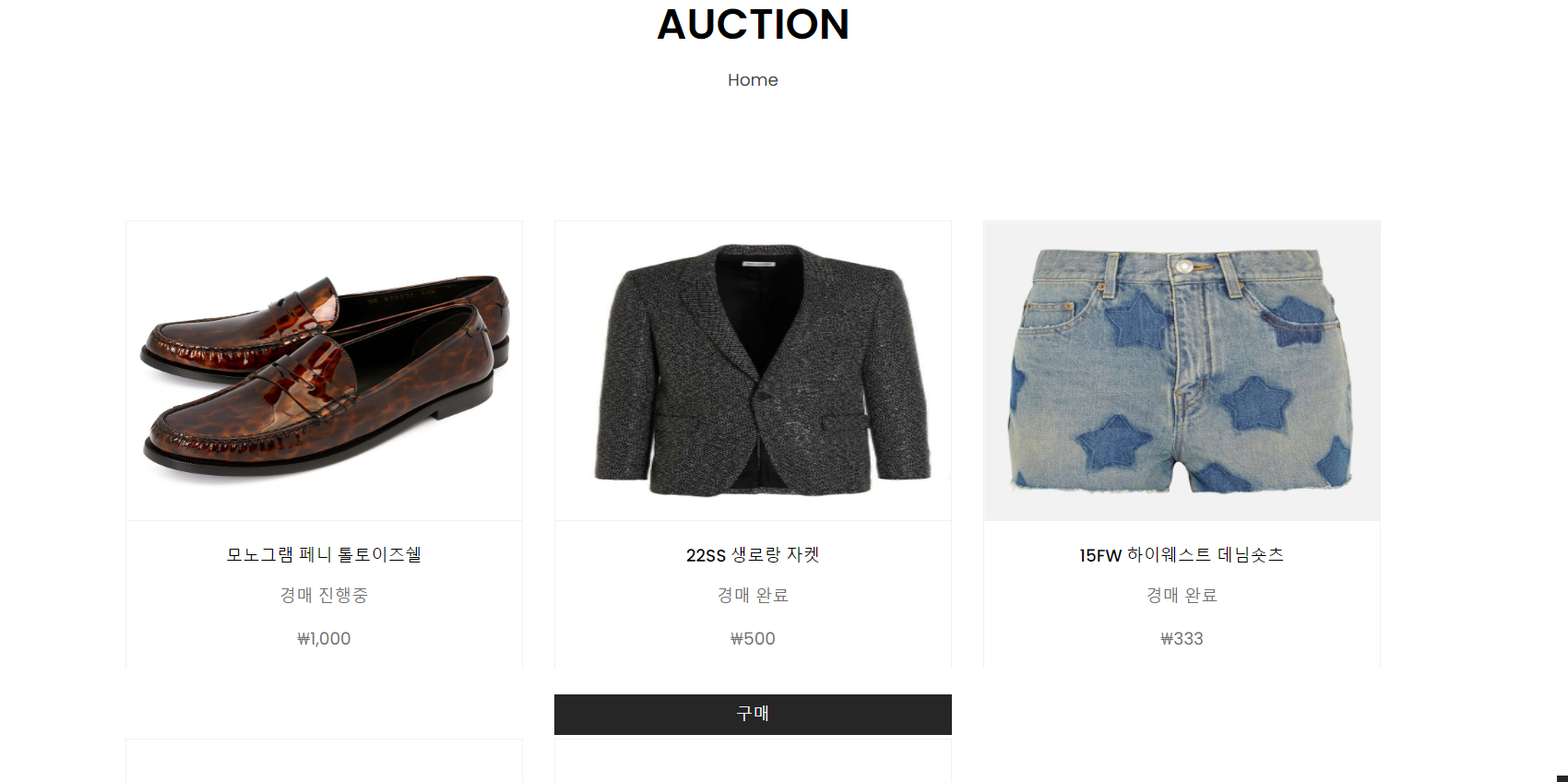
기간이 지난 경매를 종료 시키는 메서드를 작성 해준다. (List 페이지에서 경매 만료 유무를 보여주기 위함이다.)
	// 기간이 지난 경매(onOff설정)
	public void endAuction(int num);
ProductMapper.xml 에 추가
	<!-- 옥션 만료 -->
	<update id="endAuction">
		update auction set onOff=0 where num = #{num}
	</update>
ProductService.java 에 추가
	// 기간이 지난 경매(onOff설정)
	public void endAuction(int num) throws Exception;
ProductServiceImpl.java 에 추가
	@Override
	public void endAuction(int num) throws Exception {
		productmapper.endAuction(num);
	}
ProductController.java 에 추가
	// 옥션 리스트 페이지
	@GetMapping("/auctionView")
	public void auctionViewGET(Model model) throws Exception {
		System.out.println("auctionView 접속");
		ArrayList<AuctionVO> auVo = productService.getAuctionList();
		for (AuctionVO vo : auVo) {
			if (vo.getEndTime().before(new Date()) && vo.getOnOff() == 1) {
				System.out.println("auctionView에서의 경매종료 매서드 작동");
				productService.endAuction(vo.getNum());
			}
		}
		model.addAttribute("AuctionList", auVo);
	}
auctionView.jsp 추가
<%@ page language="java" contentType="text/html; charset=UTF-8" pageEncoding="UTF-8"%>
<%@ taglib prefix="c" uri="http://java.sun.com/jsp/jstl/core"%>
<%@ taglib prefix="fmt" uri="http://java.sun.com/jsp/jstl/fmt"%>
<!DOCTYPE html>
<html>
<head>
<meta charset="UTF-8">
</head>
<jsp:include page="../header.jsp"></jsp:include>
<body>
	<hr>
	<!-- Page Header Start -->
	<div class="container bg-secondary mb-3" style="max-width: 800px;">
		<div class="d-flex flex-column align-items-center justify-content-center" style="min-height: 200px">
			<h1 class="font-weight-semi-bold text-uppercase mb-3">Auction</h1>
			<div class="d-inline-flex">
				<p class="m-0">
					<a href="index.jsp">Home</a>
				</p>
			</div>
		</div>
		<c:if test="${AuctionList.size()==0 }">
			<h3 style="text-align: center;">진행된 옥션이 없습니다.</h3>
		</c:if>
	</div>
	<!-- Page Header End -->
	<!-- Shop Start -->
	<div id="my-container" class="container-fluid pt-5">
		<!-- Shop Product Start -->
		<div class="col-lg-9 col-md-12">
			<div class="row pb-3">
				<c:forEach var="AuctionList" items="${AuctionList }">
					<div class="col-lg-4 col-md-6 col-sm-12 pb-1" align="center">
						<div class="card product-item border-0 mb-4">
							<div class="card-header product-img position-relative overflow-hidden bg-transparent border p-0">
								<a href="auctionDetail?num=${AuctionList.num}&pName=${AuctionList.pname}">
									<img class="img-fluid w-100" style="height: 280px" src="../resources/img/${AuctionList.imgUrl}" alt="">
								</a>
							</div>
							<div class="card-body border-left border-right text-center p-0 pt-4 pb-3">
								<h6 class="text-truncate mb-3">${AuctionList.pname}</h6>
								<c:if test="${AuctionList.onOff == 1}">
									<p>경매 진행중</p>
								</c:if>
								<c:if test="${AuctionList.onOff == 0}">
									<p>경매 완료</p>
								</c:if>
								<div class="d-flex justify-content-center">
									<%-- 통화 단위 지정 --%>
									<fmt:formatNumber value="${Integer.parseInt(AuctionList.price)}" pattern="₩###,###" />
								</div>
							</div>
						</div>
						<c:if test="${AuctionList.onOff == 0}">
							<c:if test="${user.userid eq AuctionList.userid}">
								<c:choose>
									<c:when test="${AuctionList.endPrice > 0}">
										<input type="button" class="btn btn-primary px-3" style="width: 100%;" value="구매 완료" onclick="#" disabled="disabled">
									</c:when>
									<c:otherwise>
										<input type="button" class="btn btn-primary px-3" style="width: 100%;" value="구매" onclick="location.href='/product/auctionCheckOut?auNum=${AuctionList.num}'">
									</c:otherwise>
								</c:choose>
							</c:if>
						</c:if>
					</div>
				</c:forEach>
			</div>
		</div>
		<!-- Shop Product End -->
	</div>
	<!-- Shop End -->
	<hr>
</body>
<jsp:include page="../footer.jsp"></jsp:include>
</html>
header.jsp 에 수정
<a href="/product/auctionView" class="nav-item nav-link">Auction</a>
ProductMapper.java 에 추가
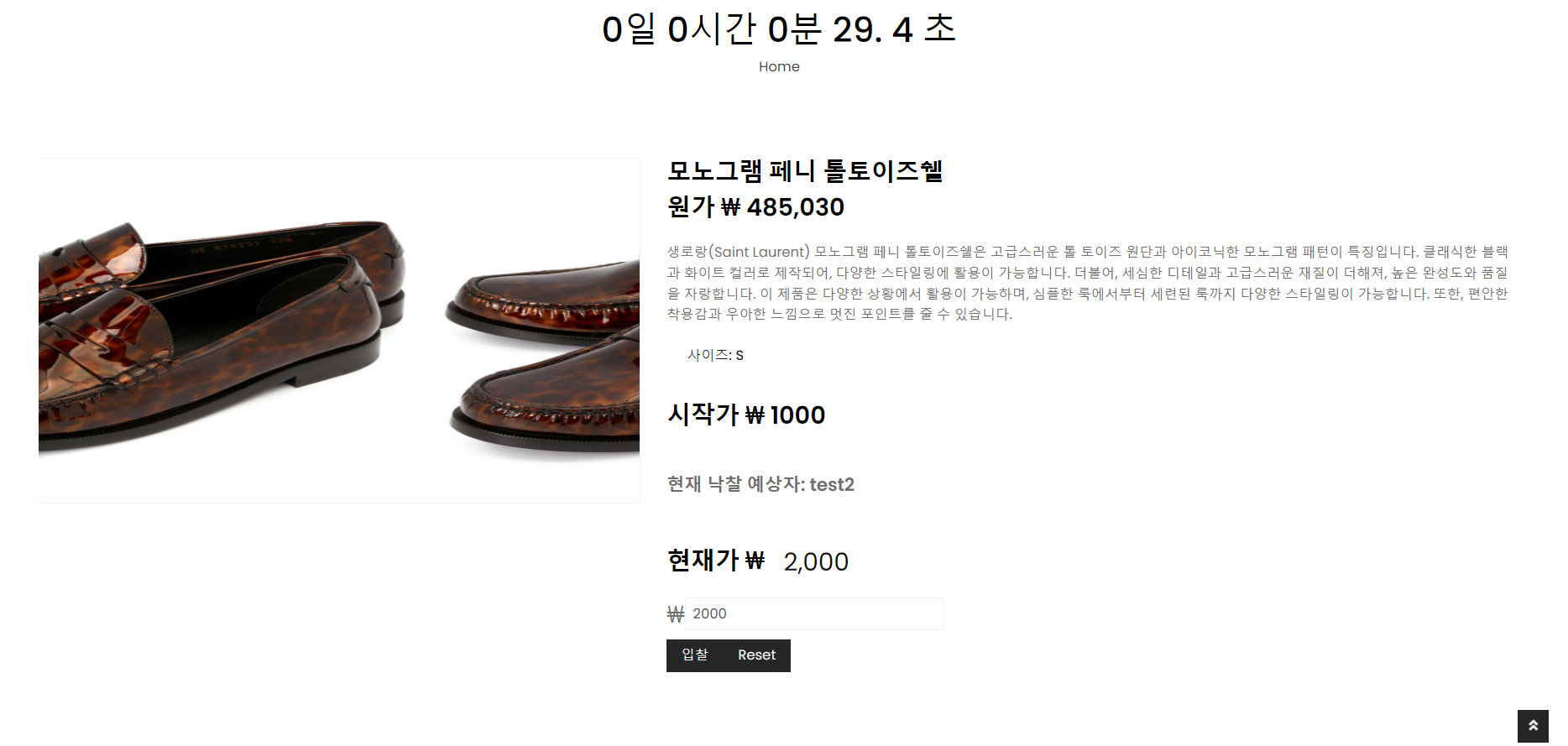
옥션 상세 페이지를 보여줄 메서드를 만들어 준다.
	// 옥션 상세 보기
	public AuctionVO getAuctionDetail(int num);
ProductMapper.xml 에 추가
    <!-- 옥션 디테일 페이지 -->
	<select id="getAuctionDetail"
		resultType="com.db.model.AuctionVO">
		select * from auction where num = #{num}
	</select>
ProductService.java 에 추가
	// 옥션 상세 보기
	public AuctionVO getAuctionDetail(int num) throws Exception;
ProductServiceImpl.java 에 추가
	@Override
	public AuctionVO getAuctionDetail(int num) throws Exception {
		return productmapper.getAuctionDetail(num);
	}
ProductController.java 에 추가
	// 옥션 상세 페이지
	@GetMapping("auctionDetail")
	public void auctionDetailGET(int num, String pName, Model model) throws Exception {
		System.out.println("auctionDetail 접속");
		AuctionVO auVo = productService.getAuctionDetail(num);
		ProductVO pVo = productService.productDetailByPname(pName);

		model.addAttribute("originProduct", pVo);
		model.addAttribute("auction", auVo);
	}
auctionDetail.jsp 추가
<%@ page language="java" contentType="text/html; charset=UTF-8" pageEncoding="UTF-8"%>
<%@ taglib prefix="c" uri="http://java.sun.com/jsp/jstl/core"%>
<%@ taglib prefix="fmt" uri="http://java.sun.com/jsp/jstl/fmt"%>
<!DOCTYPE html>
<html>
<head>
<meta charset="UTF-8">
<script type="text/javascript" src="../resources/js/auction.js"></script>
<jsp:include page="../header.jsp"></jsp:include>
<style>
@keyframes flashing {
0% {
color: transparent;
}
50% {
color: black;
}
100% {
color: transparent;
}
}
.animated {
animation: flashing 1s linear infinite;
}
</style>
</head>
<hr>
<body onload="startTimer()">
<!-- Page Header Start -->
<div class="container bg-secondary mb-3" style="max-width: 800px;">
<div class="d-flex flex-column align-items-center justify-content-center" style="min-height: 200px">
<h1 class="font-weight-semi-bold text-uppercase mb-3">Auction</h1>
<h1>
<span id="countdown"></span>
</h1>
<div class="d-inline-flex">
<p class="m-0">
<a href="/">Home</a>
</p>
</div>
</div>
</div>
<!-- Page Header End -->
<!-- Shop Detail Start -->
<div class="container-fluid py-5">
<div class="row px-xl-5">
<div class="col-lg-5 pb-5">
<div id="product-carousel" class="carousel slide" data-ride="carousel">
<div class="carousel-inner border">
<div class="carousel-item active">
<img class="w-100 pimg" src="../resources/img/${ auction.imgUrl}" alt="Image">
</div>
<div class="carousel-item">
<img class="w-100 pimg" src="../resources/img/${ auction.imgUrl}" alt="Image">
</div>
</div>
<a class="carousel-control-prev" href="#product-carousel" data-slide="prev">
<i class="fa fa-2x fa-angle-left text-dark"></i>
</a>
<a class="carousel-control-next" href="#product-carousel" data-slide="next">
<i class="fa fa-2x fa-angle-right text-dark"></i>
</a>
</div>
</div>
<div class="col-lg-7 pb-5">
<h3 class="font-weight-semi-bold">${auction.pname }</h3>
<h3 class="font-weight-semi-bold mb-4">
원가 ₩
<fmt:formatNumber value="${Integer.parseInt(originProduct.price)}" pattern="###,###" />
</h3>
<p class="mb-4">${originProduct.explain }</p>
<form action="dealAuction.do" method="post" name="frm">
<input type="hidden" name="userid" value="${user.userid }">
<div class="custom-control custom-radio custom-control-inline">
<p class="text-dark font-weight-medium mb-0 mr-3">사이즈: ${auction.psize }</p>
</div>
<div class="d-flex mb-3" style="margin-top: 40px;">
<h3 class="font-weight-semi-bold">시작가 ₩ ${auction.startPrice }</h3>
</div>
<c:choose>
<c:when test="${auction.onOff == 0 }">
<div class="d-flex mb-3" style="margin-top: 40px;">
<p style="font-size: 1.3em;" class="font-weight-semi-bold">낙찰자: ${auction.userid }</p>
</div>
</c:when>
<c:otherwise>
<div class="d-flex mb-3" style="margin-top: 40px;">
<p style="font-size: 1.3em;" class="font-weight-semi-bold">현재 낙찰 예상자: ${auction.userid }</p>
</div>
</c:otherwise>
</c:choose>
<div class="d-flex mb-3" style="margin-top: 40px;">
<h3 class="font-weight-semi-bold">현재가 ₩</h3>
<!-- animated 클래스 추가 -->
<span style="font-size: 1.8em; color: black; margin-left: 30px; transform: translate(-8px, -3px);" id="cPrice" class="animated">
<fmt:formatNumber value="${Integer.parseInt(auction.price)}" pattern="###,###" />
</span>
</div>
<c:if test="${auction.onOff== 1 }">
<div style="display: flex;">
<span style="font-size: 1.7em;">₩</span>
<input type="text" class="form-control" value="${auction.price }" name="price" maxlength="15" style="width: 300px;">
</div>
</c:if>
<div class="d-flex align-items-center mb-4 pt-2">
<input type="hidden" name="num" value="${auction.num }">
<input type="hidden" name="onOff" value="${auction.onOff }">
<input type="hidden" name="originProduct" value="${originProduct.pname }">
<!-- 입력 가격과 현재 가격을 비교를 위한 input -->
<input type="hidden" name="currentPrice" id="currentPrice" value="${auction.price }">
<c:choose>
<c:when test="${auction.onOff==0 }">
<c:if test="${user.userid eq auction.userid}">
<c:choose>
<c:when test="${auction.endPrice > 0}">
<input type="button" class="btn btn-primary px-3" style="width: 100%;" value="이미 구매 완료한 상품입니다." onclick="#" disabled="disabled">
</c:when>
</c:choose>
</c:if>
<input type="button" value="뒤로가기" class="btn btn-primary px-3" onclick="location.href='/product/auctionView'">
</c:when>
<c:otherwise>
<c:if test="${not empty user.userid}">
<input type="submit" class="btn btn-primary px-3" value="입찰" onclick="return priceCheck()">
<input type="reset" class="btn btn-primary px-3" value="Reset">
</c:if>
<c:if test="${empty user.userid}">
<input type="submit" class="btn btn-primary px-3" value="입찰" onclick="alert('로그인 후에 이용이 가능합니다.'); return false;">
<input type="reset" class="btn btn-primary px-3" value="Reset">
</c:if>
</c:otherwise>
</c:choose>
</div>
</form>
</div>
</div>
</div>
<!-- Shop Detail End -->
<hr>
<script>
// 현재 날짜와 시간 가져오기
var now = new Date().getTime();
// 타이머가 끝날 날짜와 시간 설정 (예: 2023년 5월 1일)
var countDownDate = ${auction.endTime.getTime()};
// 매 초마다 실행될 함수
if(document.frm.onOff.value != 0){
var x = setInterval(function() {
// 현재 날짜와 시간 가져오기
var now = new Date().getTime();
// 남은 시간 계산
var distance = countDownDate - now;
// 남은 시간을 초, 분, 시, 일 단위로 변환
var days = Math.floor(distance / (1000 * 60 * 60 * 24));
var hours = Math.floor((distance % (1000 * 60 * 60 * 24))
/ (1000 * 60 * 60));
var minutes = Math.floor((distance % (1000 * 60 * 60)) / (1000 * 60));
var seconds = Math.floor((distance % (1000 * 60)) / 1000);
var milliseconds = distance % 10;
// 표시할 텍스트 생성
var countdownText = days + "일 " + hours + "시간 " + minutes + "분 "
+ seconds + ". " + milliseconds + " 초 ";
// 텍스트를 countdown ID를 가진 HTML 요소에 삽입
document.getElementById("countdown").innerHTML = countdownText;
// 타이머 종료 시 실행될 함수
if (distance <= 0) {
sendOnOffToServer();
clearInterval(x);
document.getElementById("countdown").innerHTML = "기간이 만료된 경매입니다.";
}
}, 100);
} else{
document.getElementById("countdown").innerHTML = "기간이 만료된 경매입니다.";
}
function sendOnOffToServer() {
// num과 onOff 값을 서버로 전송
var numValue = ${auction.num};
// 서버로 전송할 데이터를 FormData 객체에 추가
var formData = new FormData();
formData.append('num', numValue);
// AJAX 요청
var xhr = new XMLHttpRequest();
xhr.open('POST', '/product/expiredAuction.do', true);
xhr.onreadystatechange = function() {
if (xhr.readyState === XMLHttpRequest.DONE) {
if (xhr.status === 200) {
// 서버 응답 성공
console.log('서버 응답:', xhr.responseText);
document.getElementById('message').innerHTML = '기간이 만료된 경매입니다.';
// 페이지 새로고침
location.reload();
} else {
// 서버 응답 실패
console.error('서버 응답 오류:', xhr.status);
// 페이지 새로고침
location.reload();
}
}
};
xhr.send(formData);
}
if(document.frm.onOff.value != 0){
$(document).ready(function() {
fetchPrice(); // 페이지 로드 시 가격 가져오기
// 일정 간격마다 가격을 업데이트하기 위해 fetchPrice() 함수를 호출합니다.
setInterval(fetchPrice, 1000); // 1초마다 업데이트
});
}
function fetchPrice() {
var numValue = ${auction.num};
$.ajax({
url: '/product/getPrice',
type: 'post', // POST 방식으로 변경
data: { num: numValue }, // num 값을 매개변수로 전달
success: function(price) {
console.log("가격:", price);
updatePrice(price);
},
error: function(xhr, status, error) {
console.error('가격을 가져오는 동안 오류가 발생했습니다:', error);
}
});
}
function formatPrice(price) {
return price.toString().replace(/\B(?=(\d{3})+(?!\d))/g, ",");
}
function updatePrice(price) {
const priceEl = document.getElementById('cPrice');
priceEl.innerText = formatPrice(price);
const currentPrice = document.getElementById('currentPrice');
currentPrice.value = formatPrice(price);
}
</script>
</body>
<jsp:include page="../footer.jsp"></jsp:include>
</html>
ProductMapper.java
옥션 입찰하는 메서드를 만들어 준다.
	// 경매 입찰
	public void dealAuction(AuctionVO auVo);
ProductMapper.xml 에 추가
	<!-- 옥션 입찰 -->
	<update id="dealAuction">
		update auction set price=#{price}, userid=#{userid}
		where num = #{num}
	</update>
ProductService.java 에 추가
	// 경매 입찰
	public void dealAuction(AuctionVO auVo) throws Exception;
ProductServiceImpl.java 에 추가
	@Override
	public void dealAuction(AuctionVO auVo) throws Exception {
		productmapper.dealAuction(auVo);
	}
ProductController.java 에 추가
	// 옥션 입찰
	@PostMapping("dealAuction.do")
	public String auctionEnrollPOST(AuctionVO auVo, String originProduct, Model model) throws Exception {
		System.out.println("dealAuction.do 실행");
		System.out.println("dealAuction auVo: " + auVo);
		productService.dealAuction(auVo);
		model.addAttribute("pName", originProduct);
		model.addAttribute("num", auVo.getNum());
		return "redirect:/product/auctionDetail";
	}
ProductController.java 에 추가
입찰 시 입찰가를 비동기 작동로 변경해주는 메서드를 만들어 준다.
	// 옥션 가격 실시간 업데이트
	@PostMapping("getPrice")
	@ResponseBody
	public String getPricePOST(int num, Model model) throws Exception {
		// System.out.println("getPrice 실행");
		// System.out.println("num: "+num);
		int price1 = productService.getAuctionDetail(num).getPrice();
		String price = Integer.toString(price1);
		// System.out.println("price: "+price);
		return price;
	}
옥션 기간이 만료되면 작동할 메서드를 만들어 준다.
	// 옥션 기간 만료시
	@PostMapping("expiredAuction.do")
	public void expiredAuctionPOST(int num) throws Exception {
		System.out.println("expiredAuction.do 실행");
		productService.endAuction(num);
	}
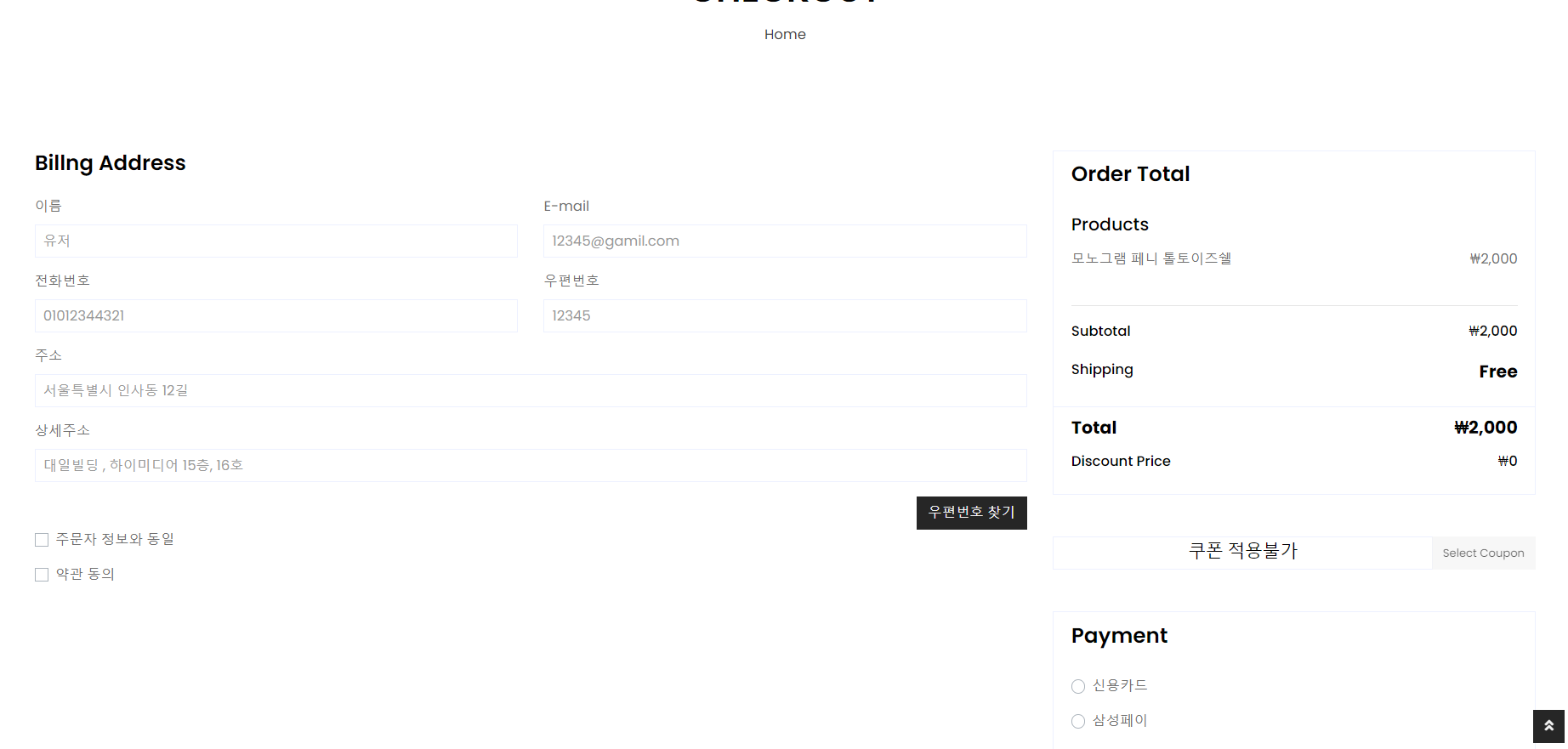
낙찰된 옥션 상품을 주문하는 체크아웃 메서드를 만들어 준다.
	// 옥션 체크아웃
	@GetMapping("/auctionCheckOut")
	public void auctionCheckOutGET(int auNum, Model model) throws Exception {
		AuctionVO auVo = productService.getAuctionDetail(auNum);
		model.addAttribute("auVo", auVo);
	}
auctionCheckOut.jsp 추가
<%@ page language="java" contentType="text/html; charset=utf-8" pageEncoding="utf-8"%>
<%@ taglib prefix="fmt" uri="http://java.sun.com/jsp/jstl/fmt"%>
<%@ taglib prefix="c" uri="http://java.sun.com/jsp/jstl/core"%>
<!DOCTYPE html>
<html>
<head>
<script src="https://code.jquery.com/jquery-3.6.0.min.js"></script>
<script src="//t1.daumcdn.net/mapjsapi/bundle/postcode/prod/postcode.v2.js"></script>
<%--아임포트 라이브러리--%>
<script type="text/javascript" src="https://cdn.iamport.kr/js/iamport.payment-1.1.5.js"></script>
<script type="text/javascript" src="https://code.jquery.com/jquery-1.12.4.min.js"></script>
</head>
<jsp:include page="../header.jsp"></jsp:include>
<body>
	<hr>
	<!-- Page Header Start -->
	<div class="container bg-secondary mb-3" style="max-width: 800px;">
		<div class="d-flex flex-column align-items-center justify-content-center" style="min-height: 200px">
			<h1 class="font-weight-semi-bold text-uppercase mb-3">Checkout</h1>
			<div class="d-inline-flex">
				<p class="m-0">
					<a href="/">Home</a>
				</p>
			</div>
		</div>
	</div>
	<!-- Page Header End -->
	<!-- Checkout Start -->
	<form action="/product/auctionPurchased" method="post" name="frm" id="frm">
		<input type="hidden" name="userid" value="${user.userid }">
		<div class="container-fluid pt-5">
			<div class="row px-xl-5">
				<div class="col-lg-8">
					<div class="mb-4">
						<h4 class="font-weight-semi-bold mb-4">Billng Address</h4>
						<div class="row">
							<div class="col-md-6 form-group">
								<label>이름</label> <input class="form-control" type="text" name="name" placeholder="${user.name }">
							</div>
							<div class="col-md-6 form-group">
								<label>E-mail</label> <input class="form-control" type="text" name="email" placeholder="${user.email }">
							</div>
							<div class="col-md-6 form-group">
								<label>전화번호</label> <input class="form-control" type="text" name="phone" placeholder="${user.phone }">
							</div>
							<div class="col-md-6 form-group">
								<label>우편번호</label> <input class="form-control address_input_1" type="text" name="address1" placeholder="${user.address1 }">
							</div>
							<div class="col-md-12 form-group">
								<label>주소</label> <input class="form-control address_input_2" type="text" name="address2" placeholder="${user.address2 }">
							</div>
							<div class="col-md-12 form-group">
								<label>상세주소</label> <input class="form-control address_input_3" type="text" name="address3" placeholder="${user.address3 }">
							</div>
							<div class="col-md-12 text-right">
								<input type="button" onclick="execution_daum_address()" class="rbutton xsmall white btn btn-primary" value="우편번호 찾기">
							</div>
							<div class="col-md-12 form-group">
								<div class="custom-control custom-checkbox">
									<input type="checkbox" class="custom-control-input" id="useraddress"> <label class="custom-control-label" for="useraddress">주문자 정보와 동일</label>
								</div>
							</div>
							<div class="col-md-12 form-group">
								<div class="custom-control custom-checkbox">
									<input type="checkbox" class="custom-control-input" id="shipto"> <label class="custom-control-label" for="shipto" data-toggle="collapse" data-target="#shipping-address">약관 동의</label>
								</div>
							</div>
						</div>
					</div>
					<div class="collapse mb-4" id="shipping-address">
						<h4 class="font-weight-semi-bold mb-4">이용약관</h4>
						<div class="row">
							<div class="col-md-6 form-group">
								<label>결제약관</label>
								<p>제1조 (목적) 이 약관은 "간편결제서비스회원"이 ㈜DIIB(이하 “DB”이라 합니다.)이 운영하는 매체(이하 “쇼핑몰”이라 한다)에서 "대상카드"를 이용하여 전자상거래를 이용 하는 경우 롯데카드 주식회사(이하 "회사"라 합니다.)가 "간편결제서비스회원"에게 제공하는 간편결제서비스(이하 "간편결제서비스"라 합니다.)의 이용조건 및 절차에 관한 기본사항을 정함을 목적으로 합니다.</p>
								<hr>
								<p>제2조 (용어의 정의) ① "대상카드"란 "간편결제서비스"를 적용하고자 하는 카드로서, "회사"가 발급한 VISA, Master, JCB, American Express Card, Local 신용카드를 소지한 개인 개별 회원, 체크카드 이용회원을 말합니다.</p>
							</div>
						</div>
					</div>
				</div>
				<div class="col-lg-4">
					<div class="card border-secondary mb-5">
						<div class="card-header bg-secondary border-0">
							<h4 class="font-weight-semi-bold m-0">Order Total</h4>
						</div>
						<div class="card-body">
							<c:set var="subprice" value="0" />
							<h5 class="font-weight-medium mb-3">Products</h5>
							<div class="d-flex justify-content-between">
								<p>${auVo.pname}</p>
								<p>
									<fmt:setLocale value="ko_KR" />
									<fmt:formatNumber type="currency" value="${auVo.price}" currencySymbol="₩" />
								</p>
							</div>
							<input type="hidden" name="pname" id="pname" value="${auVo.pname}"> <input type="hidden" name="psize" value="${auVo.psize }"> <input type="hidden" name="quantity" value="1"> <input type="hidden" name="num" value="${auVo.num }"> <input type="hidden" name="price" value="${auVo.price }"> <input type="hidden" name="auNum" value="${auVo.num }"> <input type="hidden" name="endPrice" value="${auVo.price }">
							<c:set var="subprice" value="${subprice + auVo.price}" />
							<br>
							<hr class="mt-0">
							<div class="d-flex justify-content-between mb-3 pt-1">
								<h6 class="font-weight-medium">Subtotal</h6>
								<h6 class="font-weight-medium" id="subtotalPrice">
									<fmt:setLocale value="ko_KR" />
									<fmt:formatNumber type="currency" value="${subprice}" currencySymbol="₩" />
								</h6>
							</div>
							<div class="d-flex justify-content-between">
								<h6 class="font-weight-medium">Shipping</h6>
								<h6 class="font-weight-medium">
									<strong style="font-size: 20px">Free</strong>
								</h6>
							</div>
						</div>
						<div class="card-footer border-secondary bg-transparent">
							<div class="d-flex justify-content-between mb-2">
								<h5 class="font-weight-bold">Total</h5>
								<h5 class="font-weight-bold" id="totalDisplayPrice">
									<fmt:setLocale value="ko_KR" />
									<fmt:formatNumber type="currency" value="${subprice}" currencySymbol="₩" />
								</h5>
							</div>
							<div>
								<div class="d-flex justify-content-between mb-2">
									<h6 class="font-weight-medium">Discount Price</h6>
									<h6 class="font-weight-medium" id="DiscountPrice">₩0</h6>
								</div>
							</div>
						</div>
					</div>
					<div class="input-group mb-5">
						<div class="form-control form-control-custom">
							<h5 class="font-weight-medium mb-3" align="center">쿠폰 적용불가</h5>
							<c:set var="totalprice" value="${subprice}" />
							<input id="total" type="hidden" name="totalprice" value="${totalprice }" step="1">
						</div>
						<div class="input-group-append">
							<button class="btn btn-primary" style="color: black; font-size: 0.8em;" disabled="disabled">Select Coupon</button>
						</div>
					</div>
					<div class="card border-secondary mb-5">
						<div class="card-header bg-secondary border-0">
							<h4 class="font-weight-semi-bold m-0">Payment</h4>
						</div>
						<div class="card-body">
							<div class="form-group">
								<div class="custom-control custom-radio">
									<input type="radio" class="custom-control-input" name="payment" id="paypal"> <label class="custom-control-label" for="paypal">신용카드</label>
								</div>
							</div>
							<div class="form-group">
								<div class="custom-control custom-radio">
									<input type="radio" class="custom-control-input" name="payment" id="directcheck"> <label class="custom-control-label" for="directcheck">삼성페이</label>
								</div>
							</div>
							<div class="">
								<div class="custom-control custom-radio">
									<input type="radio" class="custom-control-input" name="payment" id="banktransfer"> <label class="custom-control-label" for="banktransfer">무통장입금</label>
								</div>
							</div>
						</div>
						<div class="card-footer border-secondary bg-transparent">
							<button class="btn btn-lg btn-block btn-primary font-weight-bold my-3 py-3 " id="checkout-button">Place Order</button>
						</div>
					</div>
				</div>
			</div>
		</div>
	</form>
	<!--Checkout End -->
	<script>
	//결제

const shiptoCheckbox = document.getElementById('shipto');
const paymentRadios = document.getElementsByName('payment');
const placeOrderBtn = document.getElementById('checkout-button');

placeOrderBtn.addEventListener('click', function(event) {
	  event.preventDefault(); // 폼 제출을 막음

	  // Select Coupon 버튼 클릭 이벤트를 강제로 실행
	  $('button.btn.btn-primary').click();

	  if (!shiptoCheckbox.checked) {
	    alert('약관에 동의해주세요.');
	  } else if (!Array.from(paymentRadios).some(radio => radio.checked)) {
	    alert('결제 방법을 선택해주세요.');
	  } else {
	    // 결제 요청 함수 호출
	    iamport();
	  }
	});
function iamport() {
    var total = parseFloat($("#total").val()); // parseFloat로 숫자로 변환
    var pname = $("#pname").val();
    // 가맹점 식별코드
    IMP.init('imp36864364');

    // 결제 요청 함수 호출
    IMP.request_pay({
        pg: 'html5_inicis',
        pay_method: 'card',
        merchant_uid: 'merchant_' + new Date().getTime(),
        name: pname, // 결제창에서 보여질 이름
        amount: total, // 실제 결제되는 가격
        buyer_email: 'iamport@siot.do',
        buyer_name: '구매자이름',
        buyer_tel: '010-1234-5678',
        buyer_addr: '서울 강남구 대치동',
        buyer_postcode: '123-456'
    }, function(rsp) {
        if (rsp.success) {
            // 결제 성공 처리
            var msg = '결제가 완료되었습니다.';

            alert(msg);
            document.getElementById('frm').submit(); // 폼 제출
        } else {
            // 결제 실패 처리
            var msg = '결제에 실패하였습니다.';
            msg += '에러내용 : ' + rsp.error_msg;
            alert(msg);
            document.getElementById('frm').submit(); // 폼 제출
        }
    });
}
	 //주문자 정보 동일
	 $(document).ready(function () {
    $("#useraddress").on("change", function () {
      if ($(this).is(":checked")) {
        $("input[name='name']").val($("input[name='name']").attr("placeholder")).prop("readonly", true);
        $("input[name='email']").val($("input[name='email']").attr("placeholder")).prop("readonly", true);
        $("input[name='phone']").val($("input[name='phone']").attr("placeholder")).prop("readonly", true);
        $("input[name='address1']").val($("input[name='address1']").attr("placeholder")).prop("readonly", true);
        $("input[name='address2']").val($("input[name='address2']").attr("placeholder")).prop("readonly", true);
        $("input[name='address3']").val($("input[name='address3']").attr("placeholder")).prop("readonly", true);
      } else {
        // Restore input fields to be editable and remove the value if the checkbox is unchecked.
        $("input[type='text']").val("").prop("readonly", false);
      }
    });
  });

	// 다음 주소 연동
		function execution_daum_address() {

			new daum.Postcode(
					{
						oncomplete : function(data) {
							// 팝업에서 검색결과 항목을 클릭했을때 실행할 코드를 작성하는 부분.

							// 각 주소의 노출 규칙에 따라 주소를 조합한다.
							// 내려오는 변수가 값이 없는 경우엔 공백('')값을 가지므로, 이를 참고하여 분기 한다.
							var addr = ''; // 주소 변수
							var extraAddr = ''; // 참고항목 변수

							//사용자가 선택한 주소 타입에 따라 해당 주소 값을 가져온다.
							if (data.userSelectedType === 'R') { // 사용자가 도로명 주소를 선택했을 경우
								addr = data.roadAddress;
							} else { // 사용자가 지번 주소를 선택했을 경우(J)
								addr = data.jibunAddress;
							}

							// 사용자가 선택한 주소가 도로명 타입일때 참고항목을 조합한다.
							if (data.userSelectedType === 'R') {
								// 법정동명이 있을 경우 추가한다. (법정리는 제외)
								// 법정동의 경우 마지막 문자가 "동/로/가"로 끝난다.
								if (data.bname !== ''
										&& /[동|로|가]$/g.test(data.bname)) {
									extraAddr += data.bname;
								}
								// 건물명이 있고, 공동주택일 경우 추가한다.
								if (data.buildingName !== ''
										&& data.apartment === 'Y') {
									extraAddr += (extraAddr !== '' ? ', '
											+ data.buildingName
											: data.buildingName);
								}
								// 표시할 참고항목이 있을 경우, 괄호까지 추가한 최종 문자열을 만든다.
								if (extraAddr !== '') {
									extraAddr = ' (' + extraAddr + ')';
								}
								// 조합된 참고항목을 해당 필드에 넣는다.
								// document.getElementById("sample6_extraAddress").value = extraAddr;
								addr += extraAddr;

							} else {
								//document.getElementById("sample6_extraAddress").value = '';
								addr += ' ';
							}

							// 우편번호와 주소 정보를 해당 필드에 넣는다.
							//document.getElementById('sample6_postcode').value = data.zonecode;
							//document.getElementById("sample6_address").value = addr;
							// 커서를 상세주소 필드로 이동한다.
							$(".address_input_1").val(data.zonecode);
							$(".address_input_2").val(addr);

							//  document.getElementById("sample6_detailAddress").focus();

							// 상세주소 입력란 disabled 속성 변경 및 커서를 상세주소 필드로 이동한다.
							$(".address_input_3").attr("readonly", false);
							$(".address_input_3").focus();
						}
					}).open();
		}

</script>
	<hr>
</body>
<jsp:include page="../footer.jsp"></jsp:include>
</html>
ProductMapper.java 에 추가
낙찰된 옥션 상품을 최종 결제 하는 메서드를 만들어 준다.
	// 옥션 endPrice 설정
	public void setAuctionEndPrice(int num, int endPrice);

	// 제품 이름,사이즈로 제품 불러오기
	public ProductVO productDetailByPnamepSize(String pname, String psize);
ProductMapper.xml 에 추가
	<!-- 옥션 낙찰가 -->
	<update id="setAuctionEndPrice">
		update auction set endprice = #{arg0} where num =
		#{arg1}
	</update>

	<!-- 제품 이름,사이즈로 제품상세 불러오기 -->
	<select id="productDetailByPnamepSize"
		resultType="com.db.model.ProductVO">
		select * from product where pname = #{param1} and psize =
		#{param2}
	</select>
ProductService.java 에 추가
	// 옥션 endPrice 설정
	public void setAuctionEndPrice(int num, int endPrice) throws Exception;

	// 제품 이름,사이즈로 제품 불러오기
	public ProductVO productDetailByPnamepSize(String pname, String psize) throws Exception;
ProductServiceImpl.java 에 추가
	@Override
	public void setAuctionEndPrice(int num, int endPrice) throws Exception {
		productmapper.setAuctionEndPrice(num, endPrice);

	}

	@Override
	public ProductVO productDetailByPnamepSize(String pname, String psize) throws Exception {
		return productmapper.productDetailByPnamepSize(pname, psize);
	}
ProductController.java 에 추가
	// 옥션 결제완료
	@PostMapping("auctionPurchased")
	public String auctionPurchasedPOST(CartVO cart, UserVO uVo, int totalprice, int auNum, int endPrice, Model model)
			throws Exception {
		System.out.println("auctionPurchased 실행");
		AuctionVO auVo = productService.getAuctionDetail(auNum);
		String param1 = auVo.getPname();
		String param2 = auVo.getPsize();
		// System.out.println("pname/psize"+ param1+"/"+param2);
		cart.setNum(productService.productDetailByPnamepSize(param1, param2).getNum()); // cart num 수정
		cart.setResult(0);
		// productService.addCart(cart);
		// System.out.println("endPrice: "+endPrice);
		int arg1 = auNum;
		int arg0 = endPrice;
		productService.setAuctionEndPrice(arg0, arg1); // 옥션 endPrice 설정
		int orderNumber = productService.getLatestOrderNumber(uVo.getUserid());// orderNumber를 가져옴

		productService.addOrderDetail(cart, totalprice, orderNumber, uVo.getName(), uVo.getPhone(), uVo.getEmail(),
				uVo.getAddress1(), uVo.getAddress2(), uVo.getAddress3());

		// productService.cartResultChange(cart.getCartnum(), cart);

		ArrayList<ProductVO> plist = productService.getAllProduct();
		model.addAttribute("plist", plist); // 상품정보 불러오고 저장

		ArrayList<OrderVO> olist = productService.getOrderList(orderNumber);
		model.addAttribute("olist", olist); // 마지막 주문정보를 불러오고 저장

		return "/product/orderList";
	}